
Quick Answer
Use the California Secretary of State bizfileOnline Business Search to run a California entity search by business name or filing number. The search is useful for reviewing existing corporations, LLCs, limited partnerships, and other records, but California says the online Business Search is only a preliminary search and not a formal name availability decision.
How to Search California Business Entity Records
California business entity records are searched through the Secretary of State’s bizfileOnline portal. You can start with a basic search, then use advanced filters when you need to narrow by entity type, status, or filing date.
Access the California Entity Search Tool
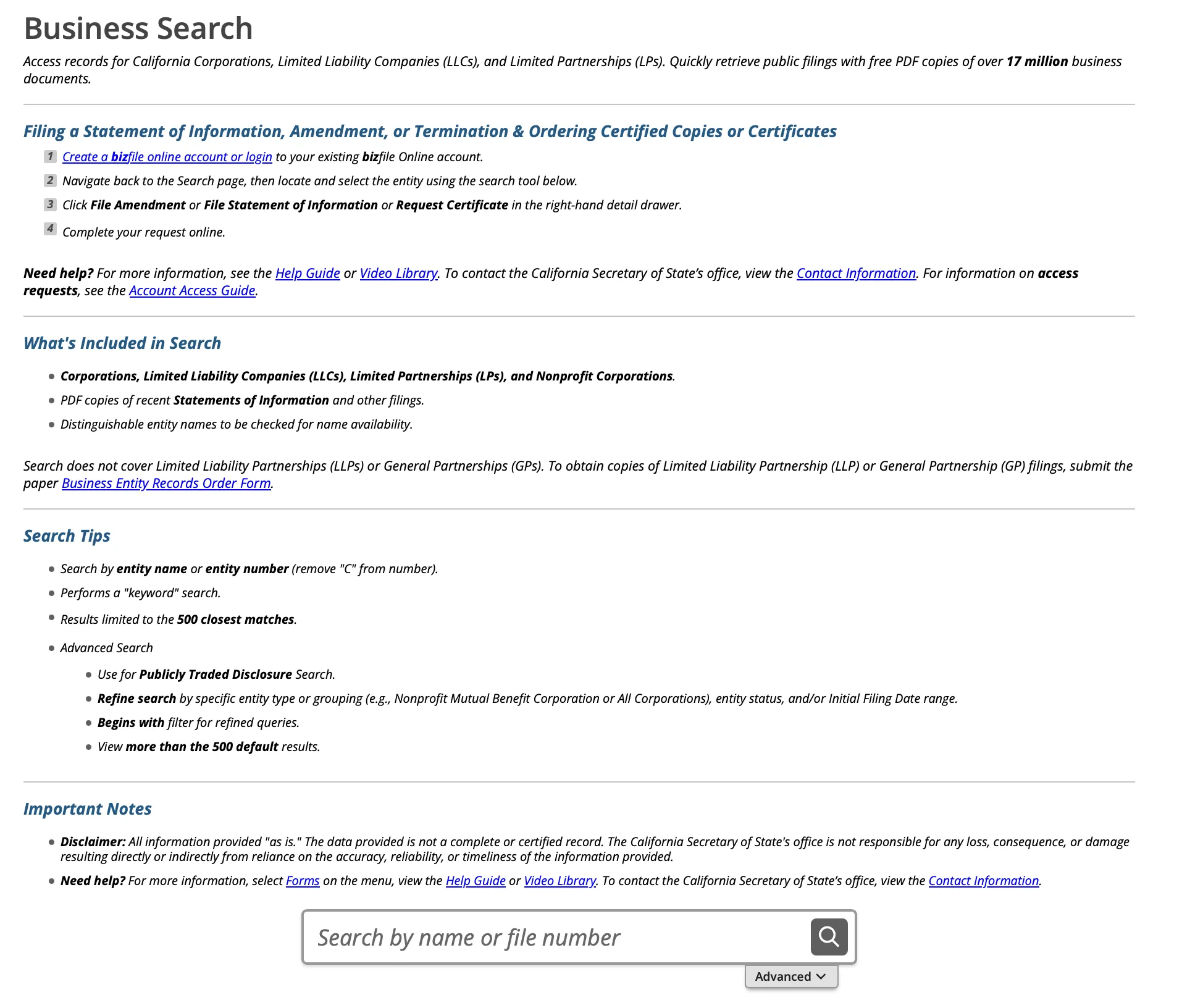
Go to the California business entity search page at https://bizfileonline.sos.ca.gov/search/business. This is the official Secretary of State search page for looking up California business entity records.
Define the Search Criteria
You can perform a basic or advanced search. For a basic search, enter the filing number or the full or partial business name into the search box. Click the magnifying glass icon to run the search.
For name planning, start with the core words of the proposed name instead of relying only on an entity ending such as LLC, Inc., Corporation, or LP. To apply filters, click “Advanced” and proceed to the next step.
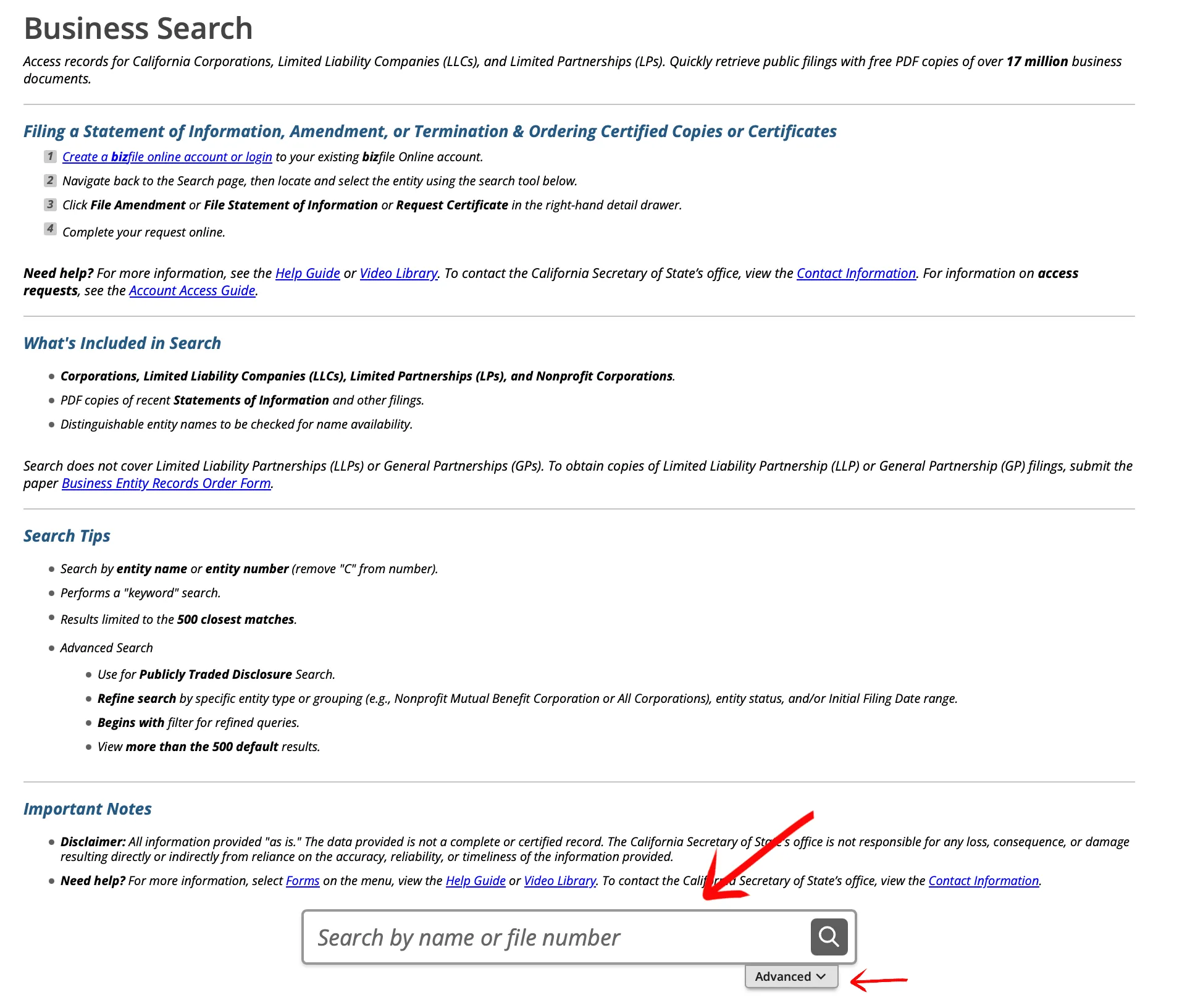
Use the Advanced Search
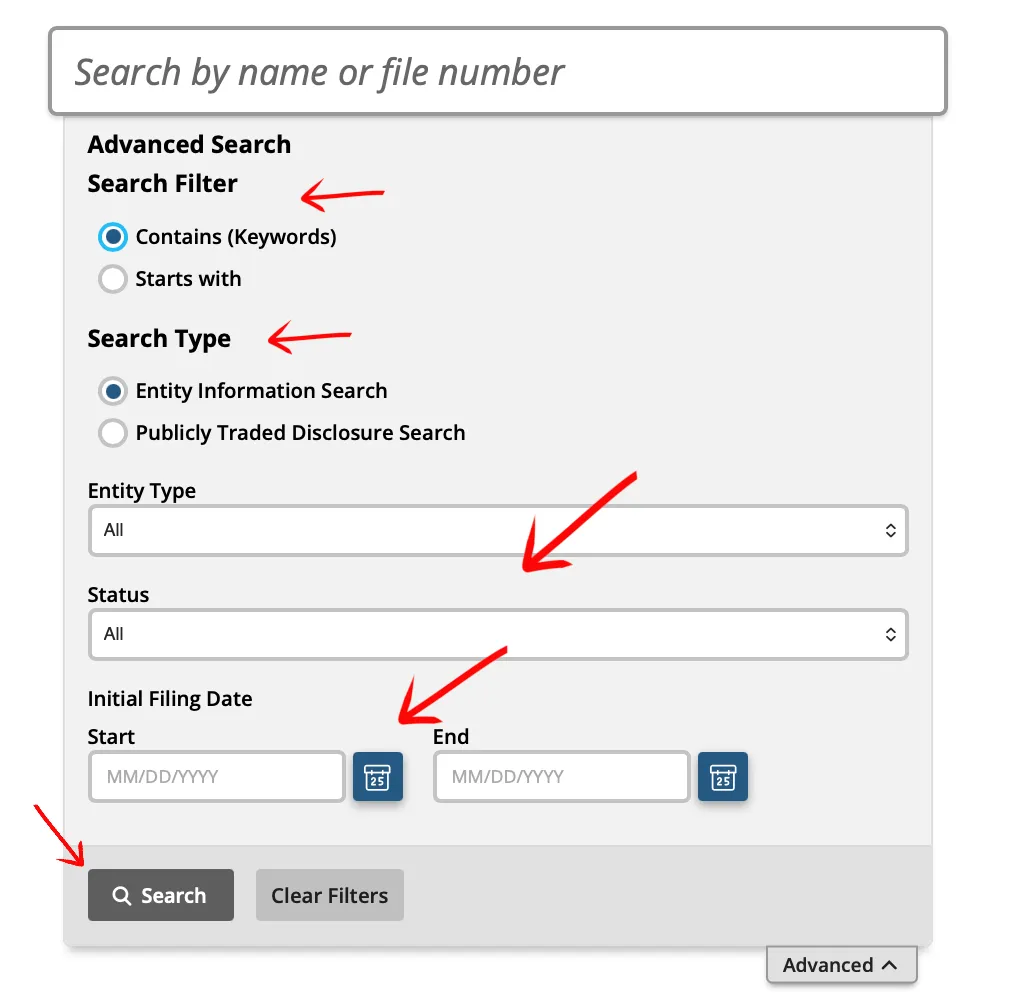
Use the advanced search tool to apply specific filters to your query. Provide information or make a selection for any of the following fields:
- Search Filter
- Search Type
- Entity Type
- Status
- Filing Date
Advanced filters are helpful when a common word returns too many results or when you need to compare a proposed LLC name against LLC records rather than corporations or other entity types.
Review the Table Results
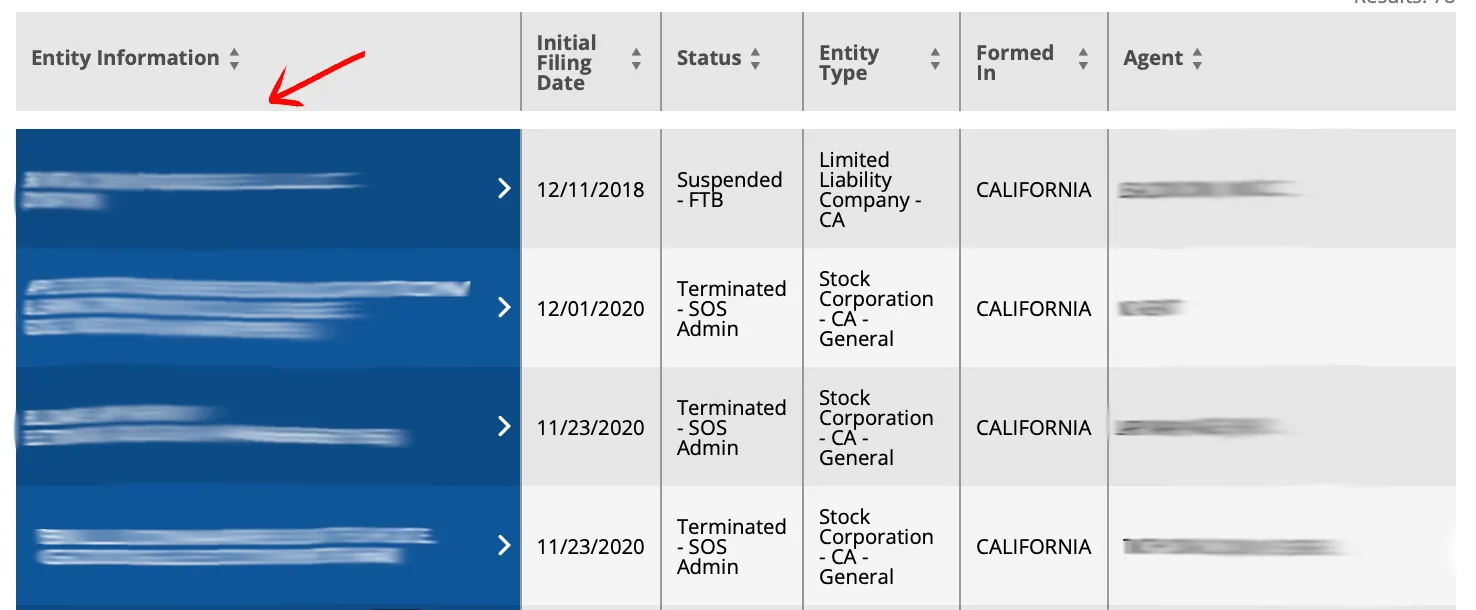
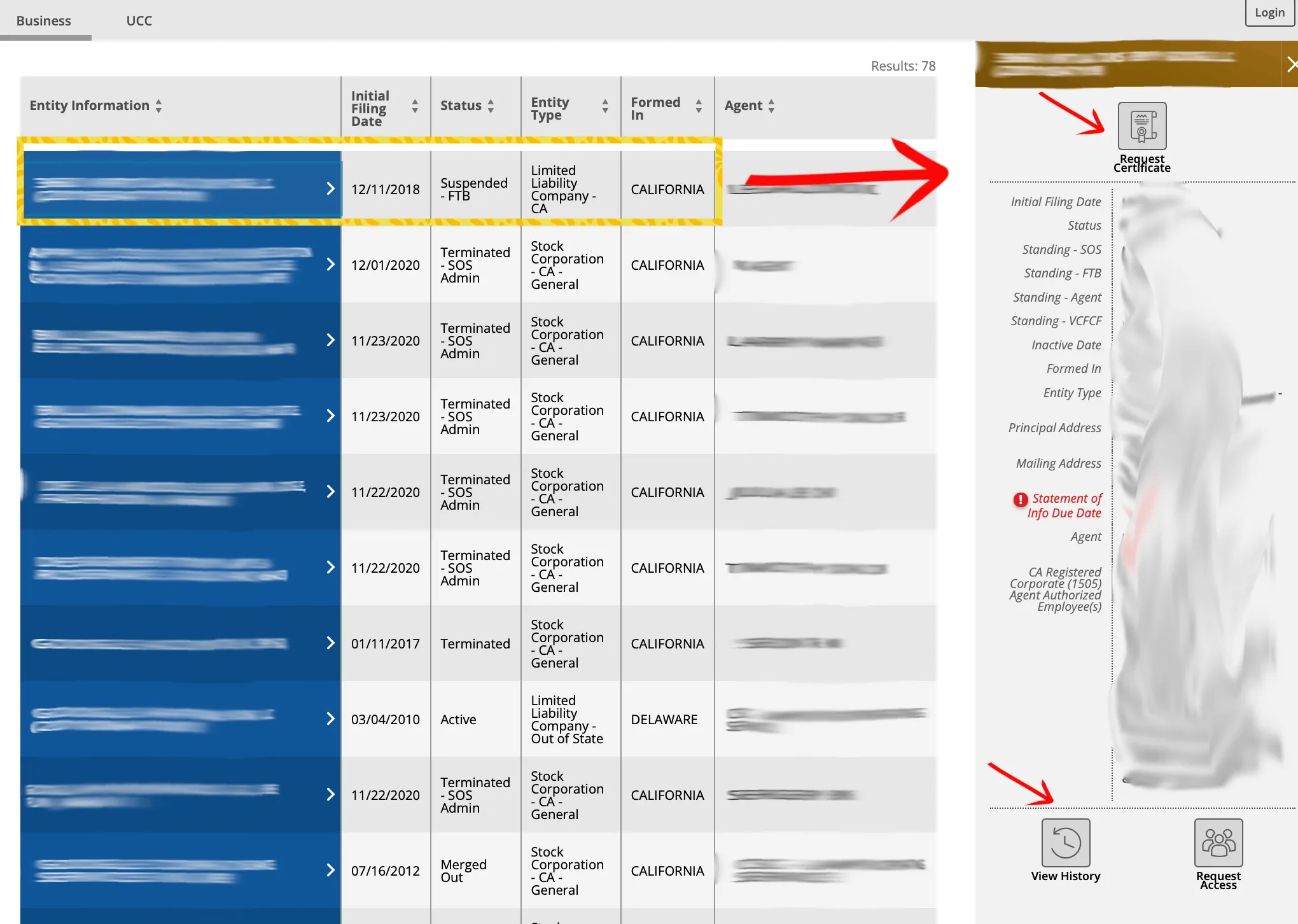
Your results will appear in a table. Sort the columns by clicking the provided arrows. The table displays:
- Entity Information
- Initial Filing Date
- Status
- Entity Type
- Formed In
- Agent
Click the business name in the first column to view additional details about the entity. Check exact matches, close spelling variations, and records that use the same core wording with a different entity ending.
View Business Entity Information
Check the right side of the page to view the entity contact information, formal standing, and processing agent details. Available data fields may include:
- Initial Filing Date
- Status
- Standing, SOS
- Standing, FTB
- Standing, Agent
- Standing, VCFCF
- Inactive Date
- Formed In
- Entity Type
- Principal Address
- Mailing Address
- Statement Of Information
- Due Date
- Agent
Select the available links when you need additional records or actions:
- Request Certificate
- View History
- Request Access
If the search returns no close matches, treat that as a useful research signal, not state approval. California reviews name compliance when formation, registration, reservation, or change documents are submitted.
View the Filing History
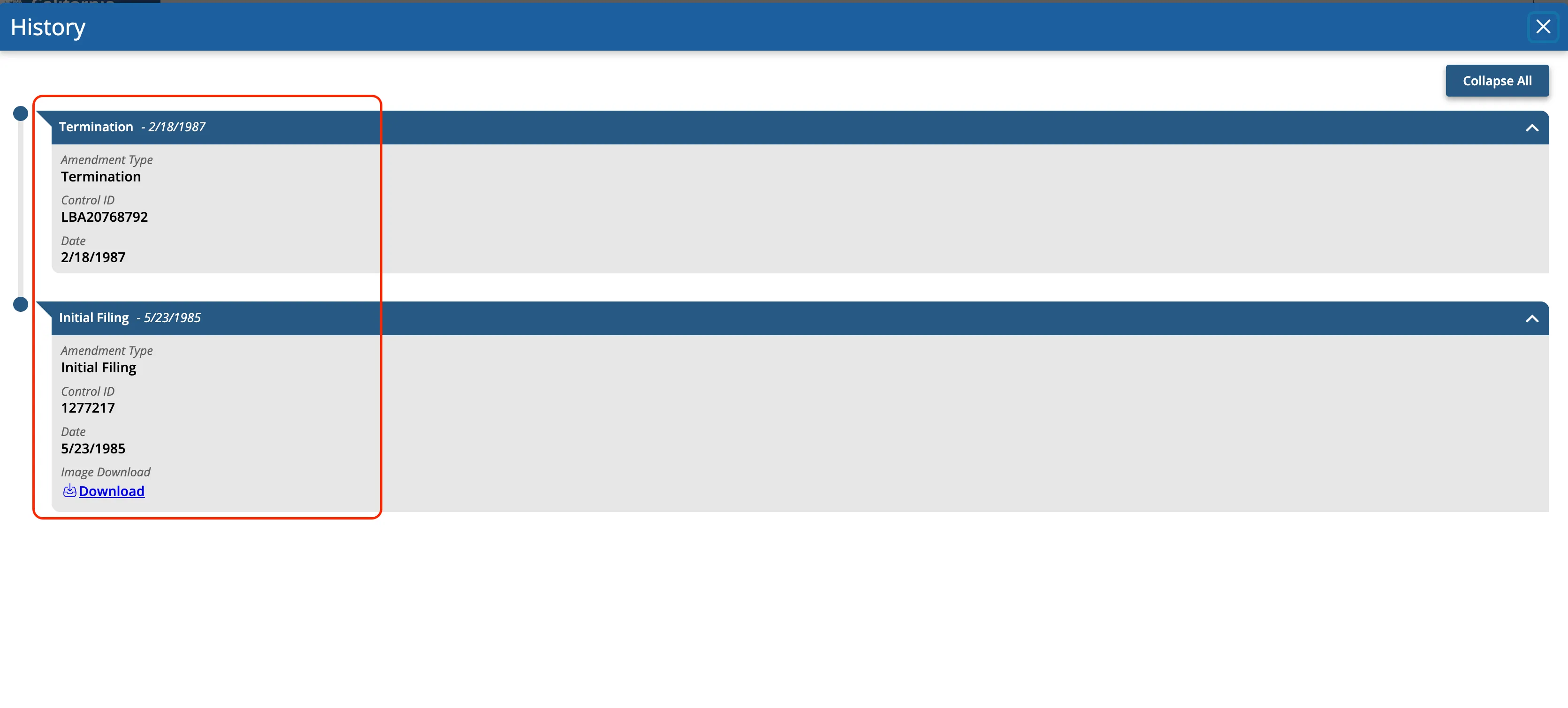
Click “View History” on the detail page to open the History panel. Each entry is one filing on the record and shows:
- Amendment Type, such as Initial Filing, Statement of Information, or Termination
- Control ID
- Date
- Image Download, when a scanned copy of the filed document is available
The history answers a question the results table cannot: whether a similar-looking record is a live business or an old one. An entity with a Termination entry stopped operating on that date, so read the history before treating a name match as an active conflict.
If the search results return no close matches for California, treat that as a preliminary screening signal only. Verify the name in the official state database, and wait for the state filing or name-reservation review before treating the name as accepted.
How to Interpret California Results
Read the Status field and the standing columns together before drawing conclusions:
- Active: The entity has a current registration with the Secretary of State. That confirms an existing record; it does not mean the name is available for new use.
- Suspended or Forfeited: The record exists but the entity has lost good standing, commonly over a missed Statement of Information (SOS standing) or a Franchise Tax Board obligation (FTB standing). The name is still on the records, so treat it as a potential conflict.
- Dissolved, Canceled, Surrendered, or Terminated: The registration has ended. Open the filing history to confirm the end date before assuming anything about the name.
- Standing columns (SOS, FTB, Agent, VCFCF): Separate compliance signals on the detail page. When reviewing an existing business, a “Not in Good Standing” flag in any column is worth checking even if the Status still reads Active.
California’s name rules are more specific than a simple keyword search. The Secretary of State says corporation, limited liability company, and limited partnership names must be distinguishable in the records and may not be likely to mislead the public, and availability is checked against like entity types. The online Business Search is a preliminary search: it does not check trademarks, service marks, or county fictitious business names. If you are choosing a new name, compare exact matches, close variants, former records, and entity-type differences before filing.
California Business Name and Filing Notes
The California Secretary of State fee schedule lists a $70 filing fee for a domestic LLC Articles of Organization and a $20 Statement of Information fee. California LLCs must also file a Statement of Information after formation and every two years after that.
California tax compliance is separate from the Secretary of State search. The Franchise Tax Board says every LLC that is doing business or organized in California must pay an $800 annual tax, and LLCs with more than $250,000 of California income may owe an additional LLC fee.
For name planning, use bizfileOnline first, then review the Secretary of State name reservation guidance before ordering branding, signs, stationery, or making financial commitments based on a proposed name.
Common Mistakes
- Treating California Business Search results as a formal name availability approval.
- Forgetting that California checks name availability against like entity types.
- Assuming the Secretary of State search covers trademarks, service marks, or county fictitious business names.
- Searching only one exact spelling and missing punctuation, spacing, plural, or abbreviation variants.
- Ignoring Franchise Tax Board standing when reviewing an existing California entity.
- Forgetting the Statement of Information and California LLC tax requirements after formation.
Sources Reviewed
- California Secretary of State Business Search
- California Secretary of State Name Reservations
- California Secretary of State Forms, Samples and Fees
- California LLC Articles of Organization Form LLC-1
- California Franchise Tax Board Limited Liability Company
Search beyond California
Company names are registered state by state, so a name that is taken in California may still be available elsewhere. The Secretary of State business search directory lists the official registry, agency contacts, and filing fees for all 50 states, the free LLC lookup guide covers name checks and LLC record details in every state, the corporation lookup guide shows what 11 state portals returned in a hands-on test, and our guide to nationwide business entity search explains how to check several states at once.
Registering in a nearby state instead? See the Nevada business entity search, Arizona business entity search, and Oregon business entity search guides.