
Quick Answer
Use the Colorado Secretary of State Business Entity Search to run a Colorado entity search by organization name or organizational ID number. For most business name checks, start with a partial organization name, review exact and similar records, then open the detail page before deciding whether a name is safe to pursue. A no-match result is only preliminary; final acceptance happens during the state filing or name-reservation review.
How to Search Colorado Business Entity Records
Colorado’s search page covers business organizations on record with the Secretary of State. It lets you search by organization name or ID number, then open a detailed organization record for status, form, jurisdiction, formation date, principal office, and registered agent information.
Access the Search Tool
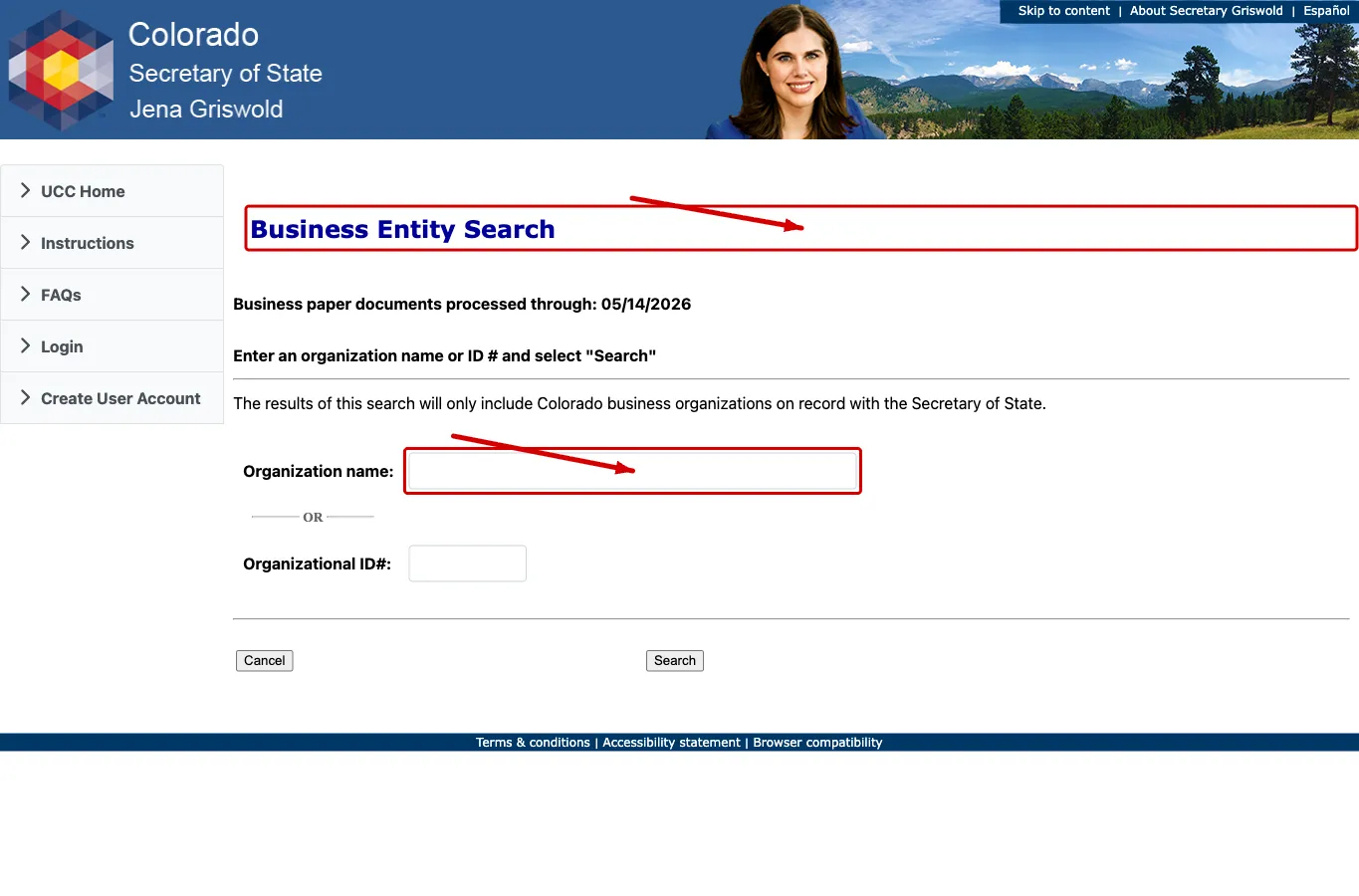
Go directly to the Colorado Business Entity Search tool at https://www.coloradosos.gov/ucc/pages/biz/bizSearch.xhtml. The page states that search results include Colorado business organizations on record with the Secretary of State.
Enter Search Criteria
The system allows you to search using:
- Organization Name
- Organizational ID Number
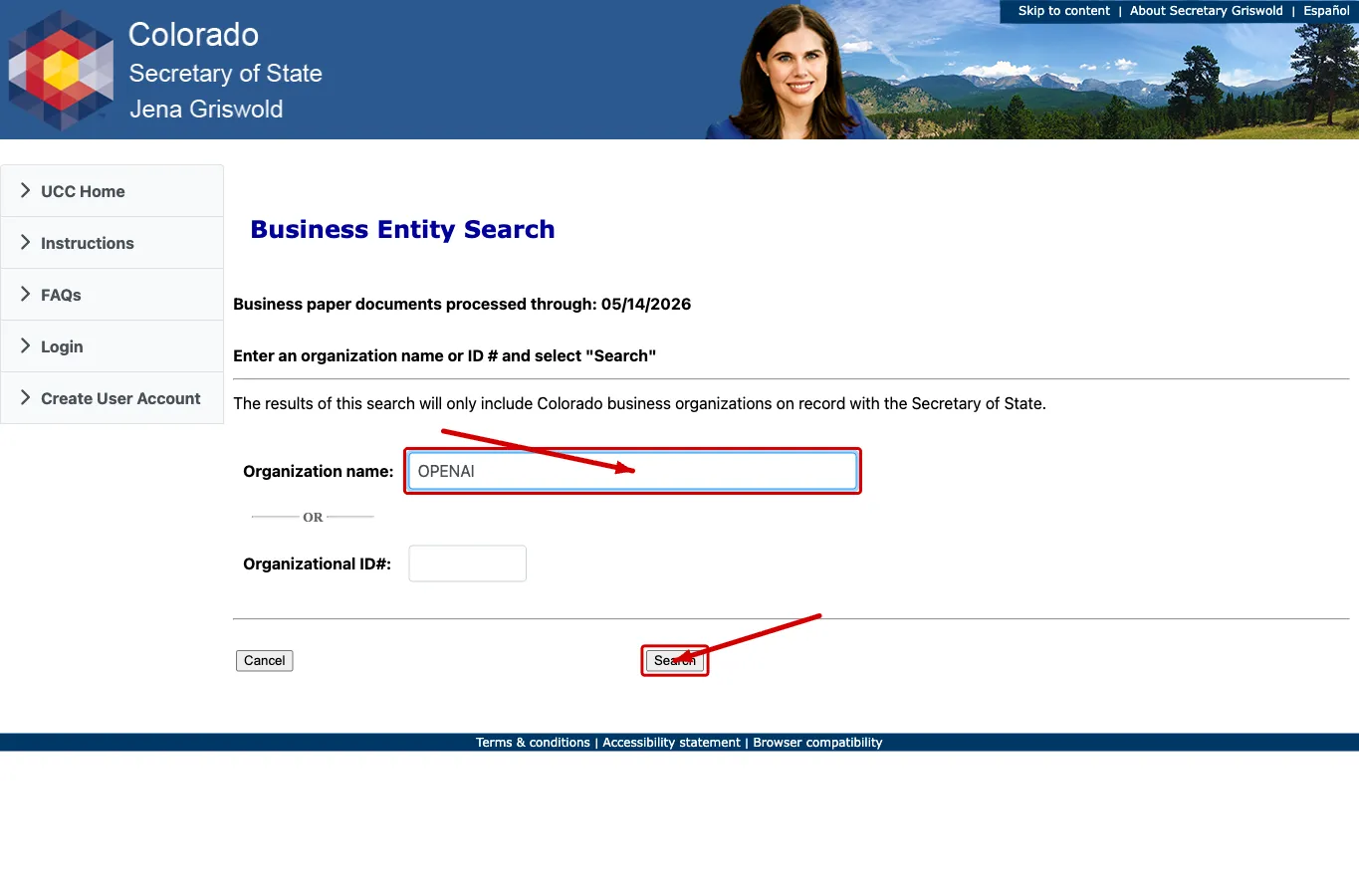
Enter your target business name into the Organization Name box. You can enter a full or partial name. For name planning, search the core wording before adding an entity ending such as LLC, Inc., Corporation, or LP. Click “Search” to view matching records.
Select an Entity for Review
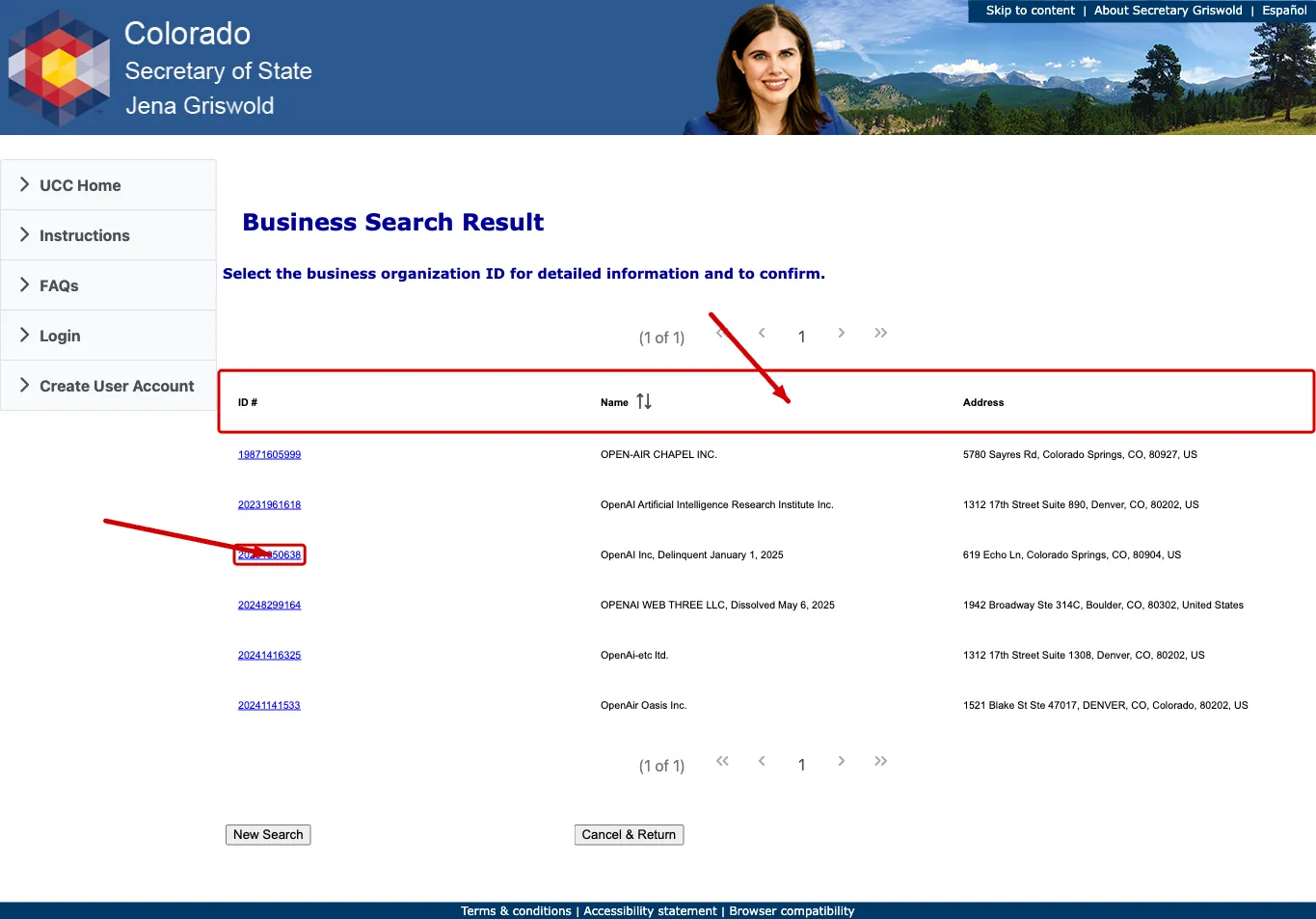
Review the results page to find existing business names. You can compare records using the available columns:
- ID Number
- Name
- Address
Click the Colorado ID Number listed in the first column to view the available details for a specific entity.
Review Entity Details
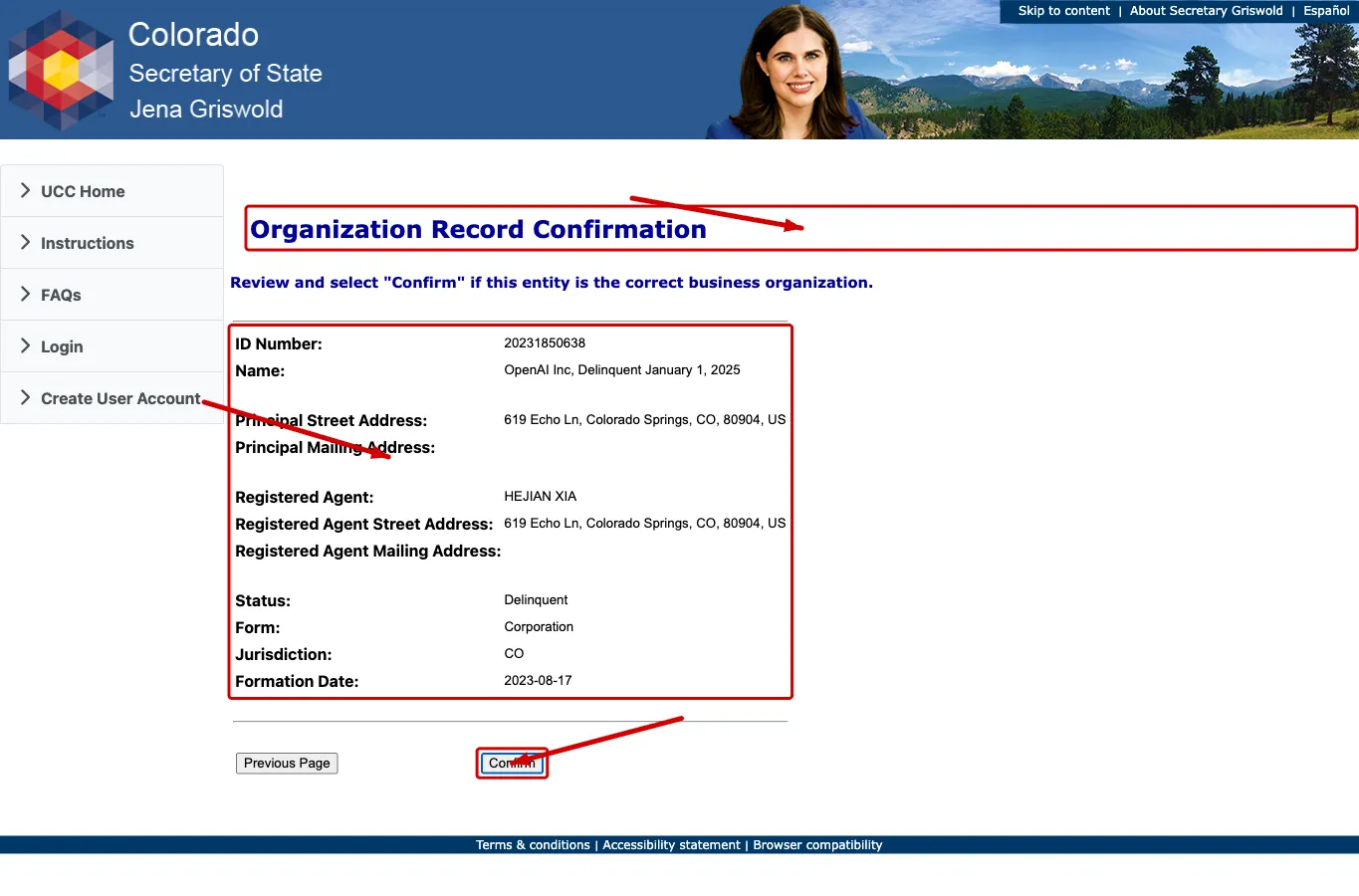
The Organization Record Confirmation page displays business entity contact information and registered agent details. Available details include:
- ID Number
- Name
- Principal Street Address
- Principal Mailing Address
- Registered Agent
- Registered Agent Street Address
- Registered Agent Mailing Address
- Status
- Form
- Jurisdiction
- Formation Date
Use this page rather than the results table alone when reviewing an existing entity or checking whether a similar name may create a filing conflict.
Perform an Optional Standard Search
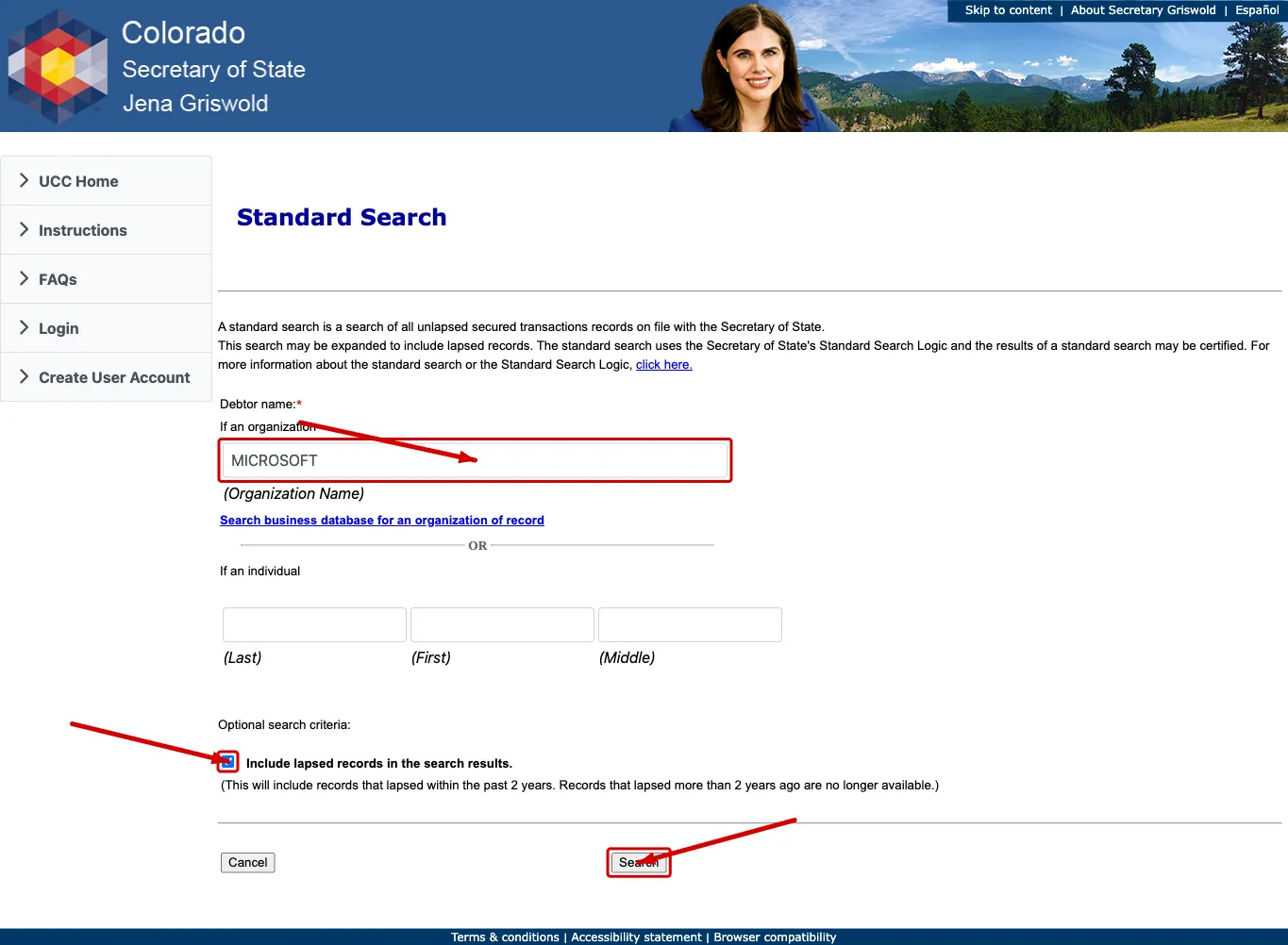
You can conduct a Standard Search on registered business entities to find financial or transaction records. Enter the name of the debtor entity into the first text box. This default search produces current financial records.
To include older records, check the box at the bottom of the page. This action includes transactions up to two years old. Click “Search” to continue.
View Transaction Records
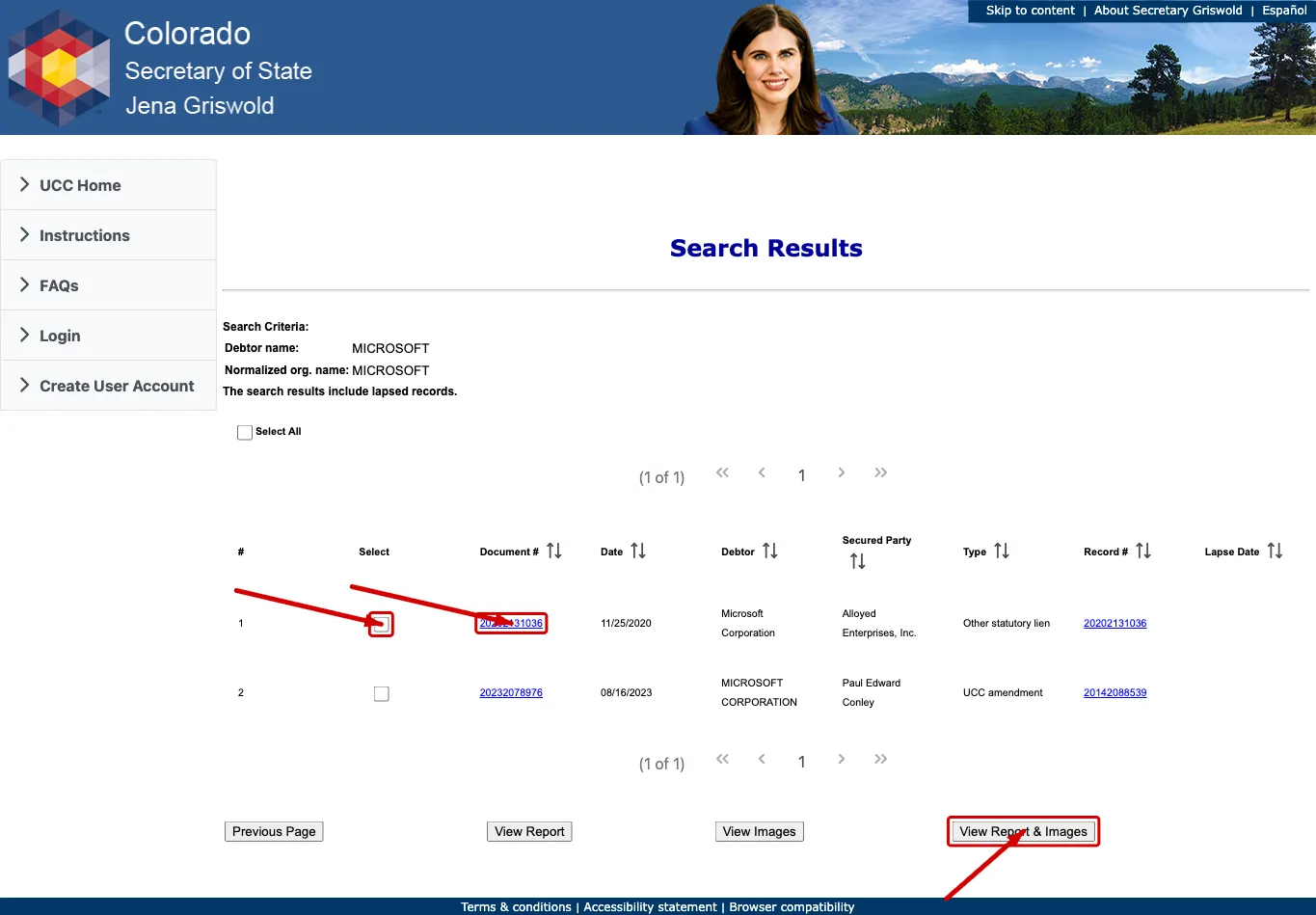
The next page displays current transactions by document number. Sort the table content in ascending or descending order using the arrows in the column headings. The available columns are:
- Document Number
- Date
- Debtor
- Secured Party
- Type
- Record Number
- Lapse Date
To view a specific transaction, click its Document Number or Record Number. Alternatively, select the checkboxes corresponding to the transactions you wish to view. Choose how the content should be presented by selecting one of the format options:
- View Report
- View Images
- View Report and Images
If the entity search returns no close matches for Colorado, treat that as a useful signal, not formal approval. The Secretary of State makes the final filing decision when documents are submitted.
If the search results return no close matches for Colorado, treat that as a preliminary screening signal only. Verify the name in the official state database, and wait for the state filing or name-reservation review before treating the name as accepted.
How to Interpret Colorado Results
A Colorado result can show whether an organization exists, whether it is in good standing or another status, the entity form, jurisdiction, formation date, and registered agent. For name planning, compare the core wording of the name before entity designators and review similar spellings, abbreviations, punctuation, and plural forms.
The Business Entity Search page states that the results include Colorado business organizations on record with the Secretary of State. It is still a search tool, not a name approval certificate. Use the organization record detail page for status and registered agent review, then verify filing requirements before submitting documents.
Colorado Business Name and Filing Notes
The Colorado Secretary of State fee schedule lists a $50 online fee for LLC Articles of Organization and a $25 online fee for a periodic report. Name reservation, reserved name renewal, and reserved name transfer are each listed at $25 online.
Colorado name reservation guidance says a reserved name can be held for 120 days. Periodic report guidance explains that a report is due during a filing period tied to the anniversary month of formation or registration.
Two Colorado specifics are worth carrying into a name search:
- There is no paper filing path. Colorado’s fee schedule lists an online fee for every business filing and “n/a” in the paper column, straight down the table. That is why Colorado records are unusually current compared with states that still process mail, and it means a name you find in the search was filed through the same system you are looking at.
- Missing the periodic report costs more than the report. The report is $25 and the late filing penalty is a further $50, so a lapsed Colorado entity has usually made a deliberate choice rather than missed a large bill. Read a delinquent status accordingly when you are judging whether a similar name is genuinely in use.
Changing an existing entity’s name is a $10 Statement of Change, which is worth knowing if your search turns up a close match that recently changed names. Before filing, review the current fee schedule and entity-specific forms.
Common Mistakes
- Searching only an exact legal name and missing partial-name or abbreviation matches.
- Treating a Colorado search result page as formal name approval.
- Ignoring entities with a different form when the same core name appears in the records.
- Reviewing the results table but not opening the organization detail page.
- Confusing business entity search with the optional transaction/UCC-style search.
- Forgetting periodic report obligations after forming or registering an entity.
Sources Reviewed
- Colorado Secretary of State Business Entity Search
- Colorado Secretary of State Business Organizations Fee Schedule
- Colorado Secretary of State Statement of Reservation of Name Help
- Colorado Secretary of State Periodic Report Help
Search beyond Colorado
Company names are registered state by state, so a name that is taken in Colorado may still be available elsewhere. The Secretary of State business search directory lists the official registry, agency contacts, and filing fees for all 50 states, the free LLC lookup guide covers name checks and LLC record details in every state, and our guide to nationwide business entity search explains how to check several states at once.
Registering in a nearby state instead? See the New Mexico business entity search, Utah business entity search, and Kansas business entity search guides.