
Quick Answer
Use the Florida Division of Corporations Sunbiz portal to check Florida business name availability and run an entity search by business name, officer, registered agent, FEI/EIN, or document number. Open the entity detail page to compare status, document number, registered agent, and filing history before relying on a result. A no-match result is only a preliminary public-records check; final name acceptance happens through the Division of Corporations filing review.
How to Search Florida Business Entity Records
The Florida Division of Corporations maintains an online portal called Sunbiz at search.sunbiz.org. The public entity search tool allows you to query business entities by name, officer, registered agent, trademark, FEI/EIN, document number, and address. The system returns basic filing information for active and historical Florida entities.
Visit the Florida Division of Corporations Portal
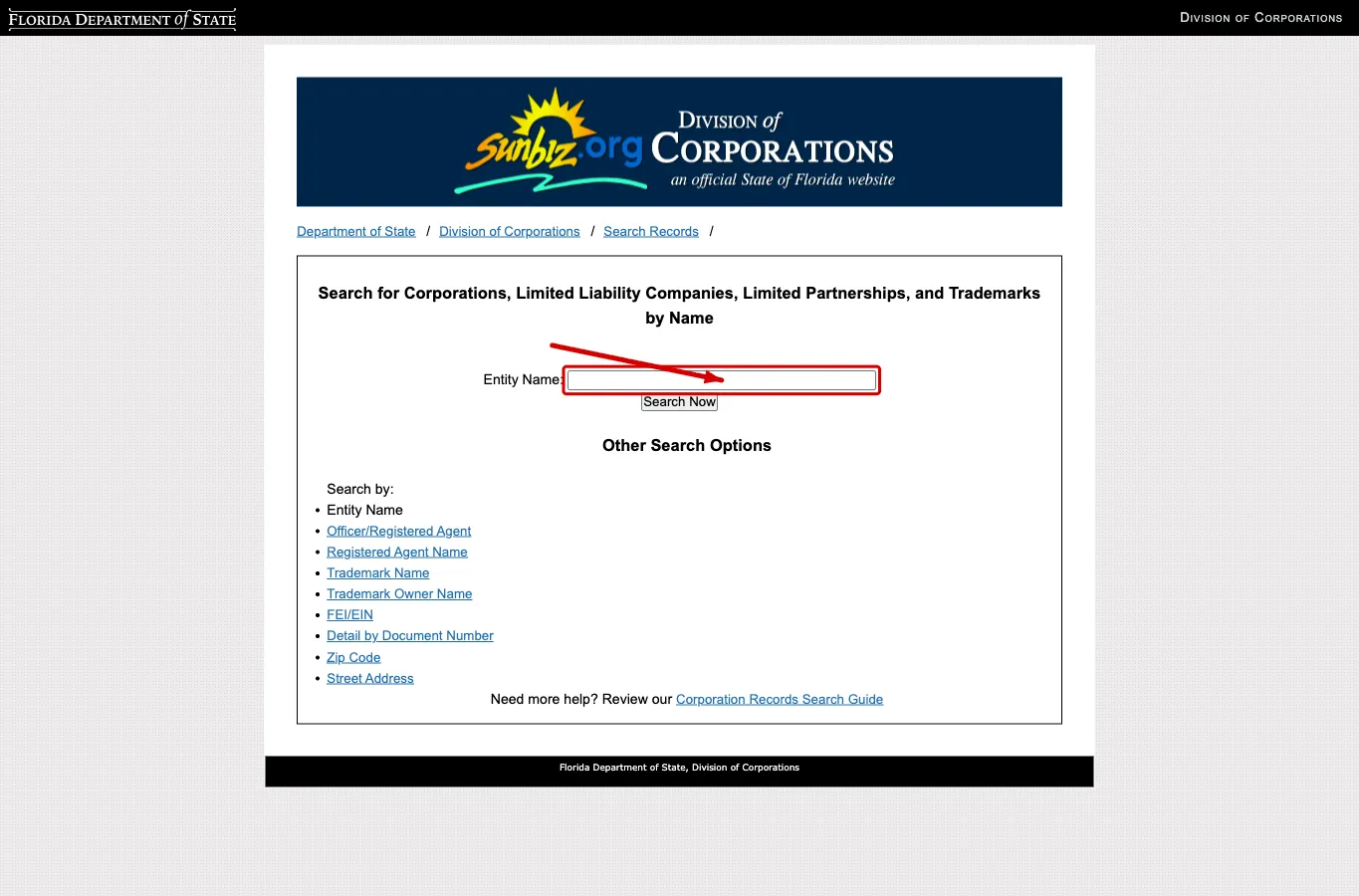
Navigate directly to the Florida Division of Corporations Sunbiz portal at https://search.sunbiz.org/Inquiry/CorporationSearch/ByName. This portal serves as the official public search tool for Florida business entities.
Use the Business Entity Search Tool
You can perform a query using various criteria listed at the bottom of the page. Select “Entity Name” to search for a specific business name. The available search criteria include:
- Entity Name
- Officer/Registered Agent
- Registered Agent Name
- Trademark Name
- Trademark Owner Name
- FEI/EIN
- Detail By Document Number
- Zip Code
- Street Address
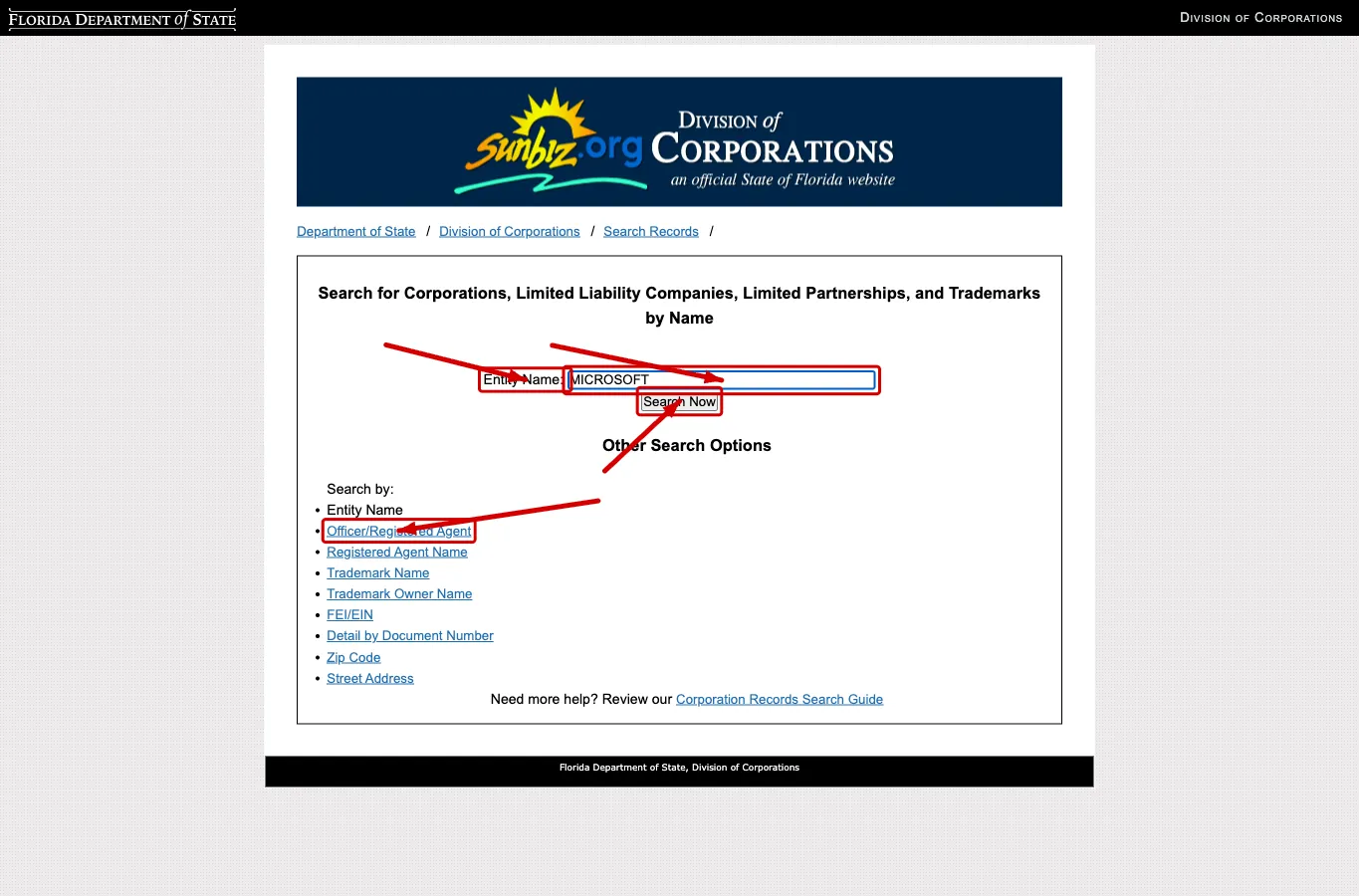
Type at least a partial name of the entity into the text box and click “Search Now.” Avoid adding entity suffixes like LLC, Inc, or Corp when searching by name, as this may cause the search to miss similar names that use different designations.
Obtain the Business Entity Details
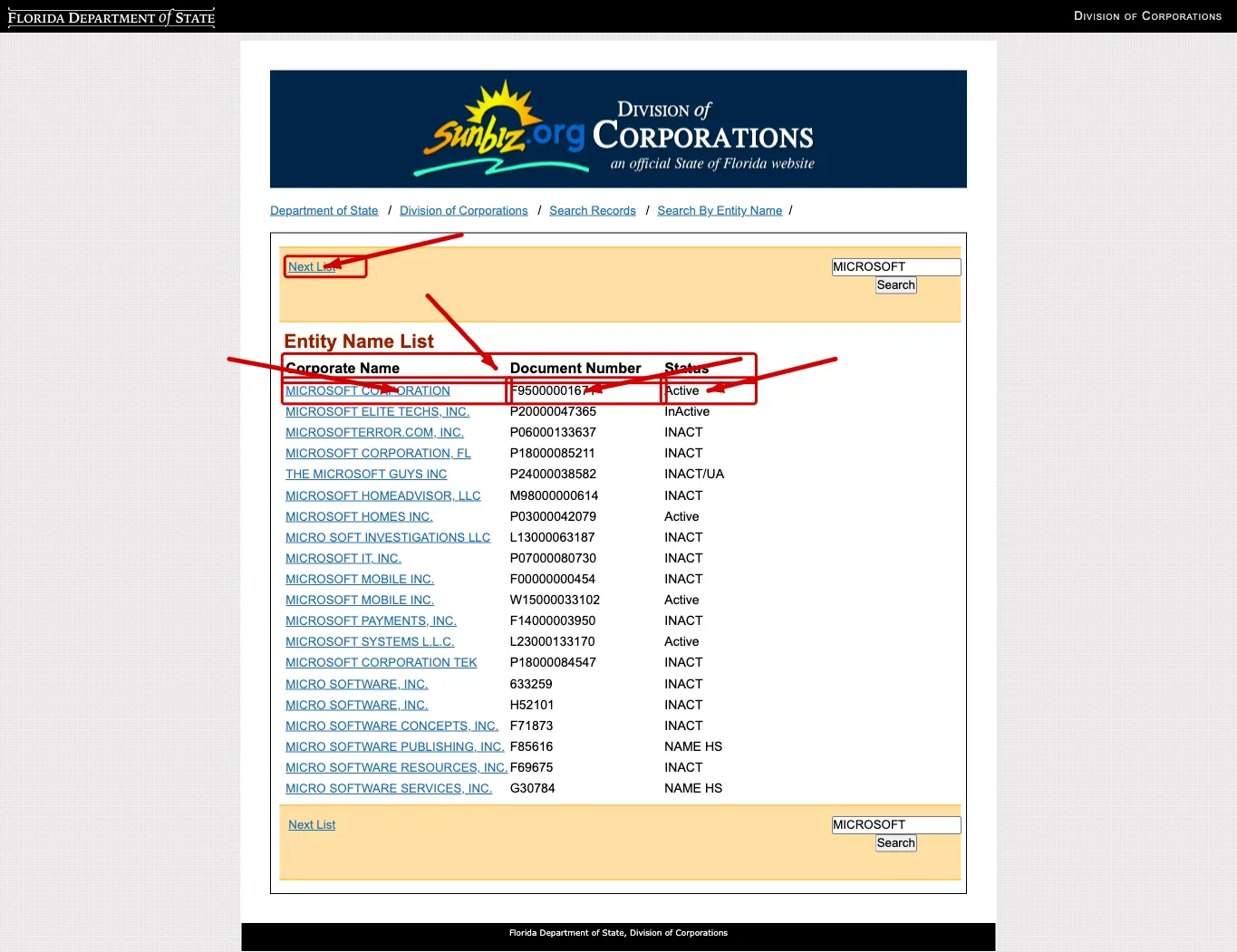
Registered Florida businesses matching your search criteria will appear in a table ordered by name. From this screen, you can review the results, move to the next table listing, or perform a new search. The table displays the following information:
- Corporate Name
- Document Number
- Status
Click the name of the entity in the first column to view its details. Note that a result with “Active” status means the entity has a current filing on record; this does not guarantee that the name is available for new use. Names can be similar without being identical, so review the details page before drawing conclusions.
Review the Filed Information
The next page displays the filing information for the selected business entity. You can use the top menu to navigate to other areas if needed. The displayed filing details include:
- Document Number
- FEI/EIN Number
- Date Filed
- State
- Status
- Last Event
- Event Date Filed
- Event Effective Date
The page also presents the contact information for the business entity:
- Principal Address
- Mailing Address
The final section includes the standing, history, and registered agent details of the entity:
- Registered Agent Name & Address
- Officer/Director Detail
- Annual Reports
- Document Images
A no-match search result is only a preliminary screening signal. Verify the proposed name in Sunbiz and wait for the Division of Corporations filing or name-reservation review before treating the name as accepted.

Check Annual Reports and Document Images
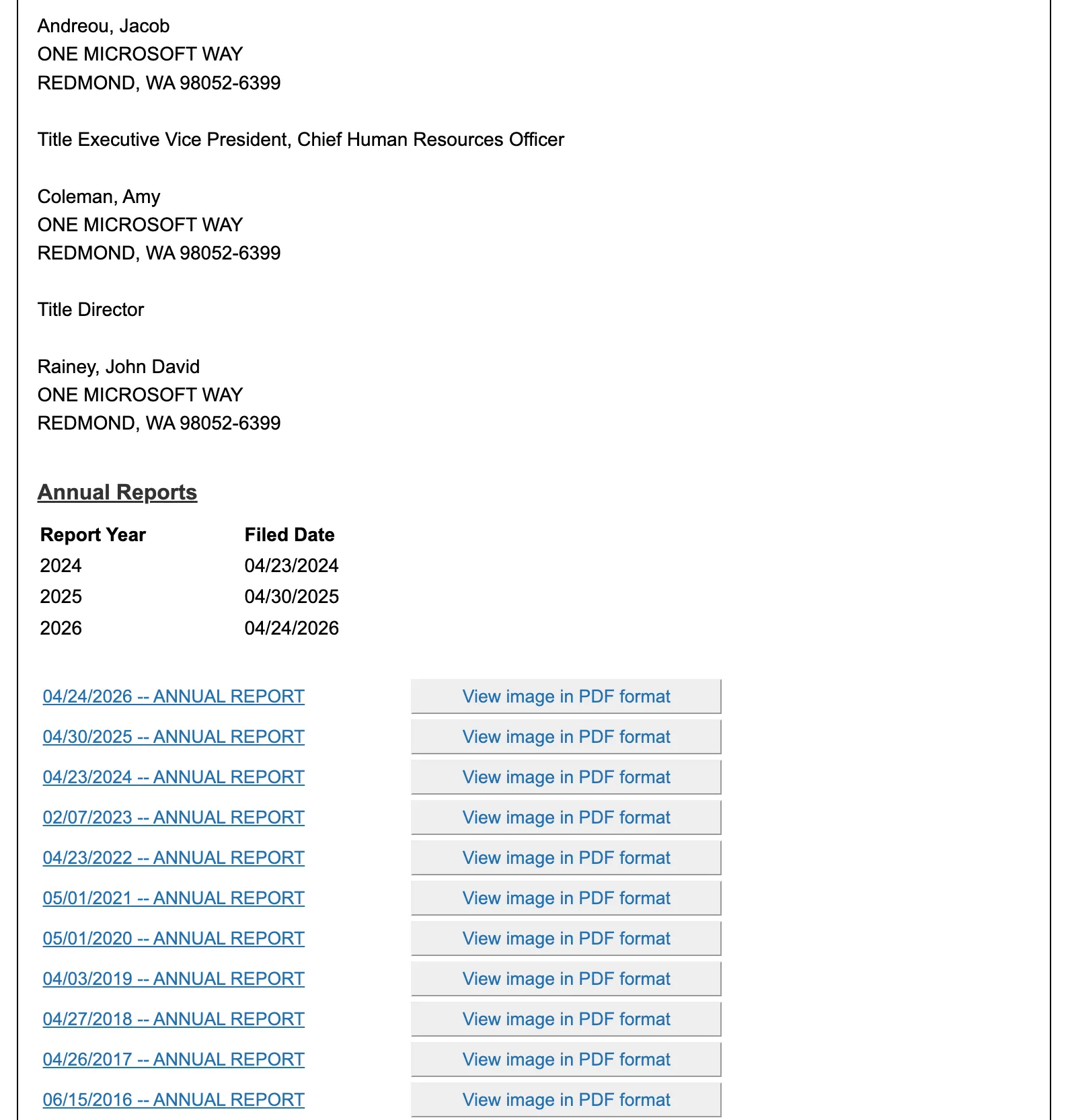
Scroll to the bottom of the entity detail page. The Annual Reports table lists each report year with its filed date, and below it every filing on the record carries a “View image in PDF format” link that opens the scanned document itself.
Use this section two ways. A record with current annual reports is being actively maintained, which strengthens an Active status reading. The document images are the primary source: open the PDF when you need to confirm what a filing actually said, such as an officer change or the original registration, instead of relying on the summary fields above.
If the search results return no close matches for Florida, treat that as a preliminary screening signal only. Verify the name in the official state database, and wait for the state filing or name-reservation review before treating the name as accepted.
How to Interpret Florida Results
Open the Sunbiz entity details page to verify the Document Number, FEI/EIN field, status, principal address, mailing address, registered agent, officer or manager records, annual reports, and document images. Florida result lists are broad, so the detail page is the place to confirm whether a similar-looking record is actually relevant.
A result showing Active means the entity has a current filing on record with the Division of Corporations. It does not mean the name is available for new use. Compare the distinctive wording before suffixes such as LLC, Inc., Corp., LP, PA, PL, or PC, and check document images when you need to confirm a historical filing.
Checking Florida Business Name Availability
Testing name availability in Florida requires navigating the Division of Corporations Sunbiz database with Florida specific distinguishability rules in mind:
- Florida Distinguishability Standard (Fla. Stat. § 605.0112): A proposed LLC name must be distinguishable in the records of the Florida Department of State from every active registered entity and active name reservation. Florida enforces a strict statutory standard: differences limited to entity suffixes (LLC, Inc., Corp.), articles (a, an, the), conjunctions (and, or), the symbol &, punctuation, or singular versus plural forms do not make a name distinguishable. For example, if Sunshine Bakery LLC is registered, neither The Sunshine Bakery Inc. nor Sunshine Bakery & Co. LLC can be approved.
- How to Search Sunbiz for Availability: When conducting a name availability query on Sunbiz, search only the root distinctive words of your business name without suffixes like LLC or Company. Because Sunbiz performs an alphabetical index scan, searching with legal endings can jump past close or identical active records.
- Lapsed Records and Reinstatement Windows: Because Florida imposes a steep $400 late penalty on annual reports filed after May 1, thousands of entities enter Administratively Dissolved or Revoked status each year. While an administratively dissolved company does not hold its name forever, statutory reinstatement protections can apply. Check the status and historical filings before assuming a dormant name is immediately clear for registration.
- Reserving a Name with the Division: If your name search shows zero conflicts and you want to lock the name before submitting Articles of Organization, Florida allows a 120-day name reservation for a $25 fee filed with the Division of Corporations.
Florida Business Name and Filing Notes
Florida’s Sunbiz search, e-file formation pages, annual report filing, and registered-agent rules are separate workflows. Use the search to understand public records first, then use the correct Division of Corporations filing path for formation, updates, annual reports, or document images.
Florida LLCs and corporations file initial articles or incorporations with the Division of Corporations, and annual reports are due by May 1 each year. The registered agent in Florida must be a Florida resident or a Florida-authorized corporation acting as agent.
One Florida number explains a great deal of what you see in the search results:
- The annual report is $138.75 on time and $538.75 after May 1. That is a $400 late penalty, not a small surcharge, and it is the reason Florida records lapse in volume. If a name you want appears to be taken by a dormant company, check the status before assuming the name is permanently gone, because Florida entities do get administratively dissolved for exactly this.
- Forming an LLC costs $125 as a required minimum: the $100 filing fee plus the $25 registered agent designation, which is not optional. Optional extras are a $30 certified copy and a $5 certificate of status.
- Name reservation is $25. Note that Florida’s corporation fee schedule is a separate table with different amounts, so a figure quoted for a corporation does not carry over to an LLC.
- Reinstatement is $100 plus every missed year’s annual report fee, which is how a lapsed Florida name can end up costing far more to recover than it cost to register.
Common Mistakes
- Stopping at the result list: Sunbiz detail pages contain document numbers, registered-agent data, annual reports, and document images that are not visible in the table.
- Misreading Active status: Active means an entity record exists; it does not make the name available.
- Searching with legal endings: Entering “LLC” or “Inc.” in the Sunbiz search box causes the alphabetical index to skip past relevant records with similar base words.
- Assuming articles or punctuation create distinguishability: Florida law disregards articles like “The”, symbols like ”&”, and minor plural differences when testing name conflicts.
- Ignoring document images: Filed PDFs can clarify amendments, conversions, or historical names.
- Missing the May 1 annual report deadline: Florida annual reports are a separate maintenance filing from the name search.
- Treating Sunbiz as final approval: The search is research; the Division of Corporations decides acceptance during filing review.
Sources Reviewed
- Florida Division of Corporations Sunbiz Entity Search
- Florida Division of Corporations — Entity Search Help
- Florida Statutes § 605.0112 — Name of Limited Liability Company
- Florida Division of Corporations LLC Fees
- Florida Division of Corporations Annual Report Filing
Search beyond Florida
Company names are registered state by state, so a name that is taken in Florida may still be available elsewhere. The Secretary of State business search directory lists the official registry, agency contacts, and filing fees for all 50 states, the free LLC lookup guide covers name checks and LLC record details in every state, the corporation lookup guide shows what 11 state portals returned in a hands-on test, and our guide to nationwide business entity search explains how to check several states at once.
Registering in a nearby state instead? See the Georgia business entity search and Alabama business entity search guides.