
Quick Answer
Use the Georgia Secretary of State Corporations Division Business Entity Search to run a Georgia entity search by business name, control number, registered agent name, or officer name. For name research, compare exact matches, similar names, and active/inactive status before choosing a filing path. A no-match result is only preliminary; final name acceptance happens when Georgia reviews a filing or name reservation.
How to Search Georgia Business Entity Records
The Georgia Corporations Division maintains the eCorp online portal for public business entity searches. The search tool allows you to query by various criteria and returns filing details such as business name, type, status, principal office address, and registered agent information.
Access the Business Entity Search Portal
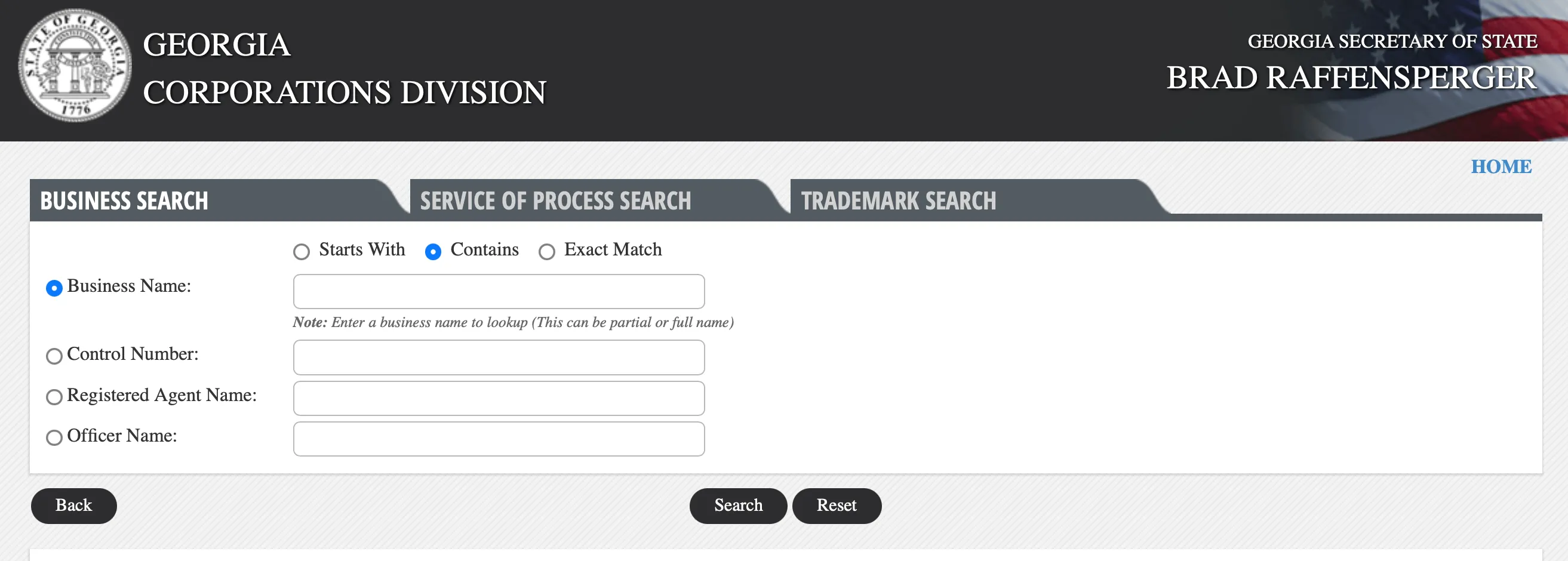
Go to the Georgia Secretary of State Corporations Division Business Entity Search page at https://ecorp.sos.ga.gov/BusinessSearch. This portal serves as the official public search tool for Georgia business entities.
Define Your Search Criteria
Select the radio button that best defines your search. The available options are:
- Business Name
- Control Number
- Registered Agent Name
- Officer Name
Refine the criteria by selecting one of the top-row radio buttons to indicate the match requirement:
- Starts With
- Contains
- Exact Match
After making your selections, click the “Search” button. For name availability research, “Contains” or “Starts With” is generally more useful than “Exact Match” because it reveals similar names that may cause a rejection during filing.
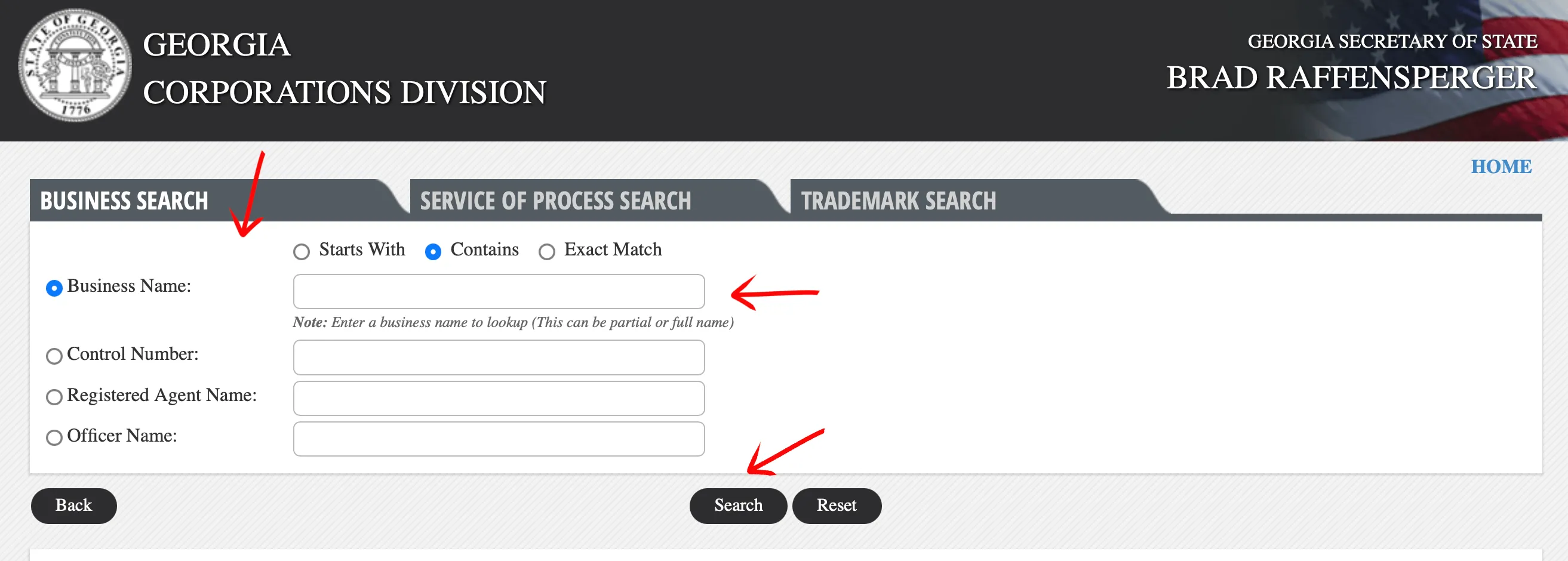
Review the Search Results
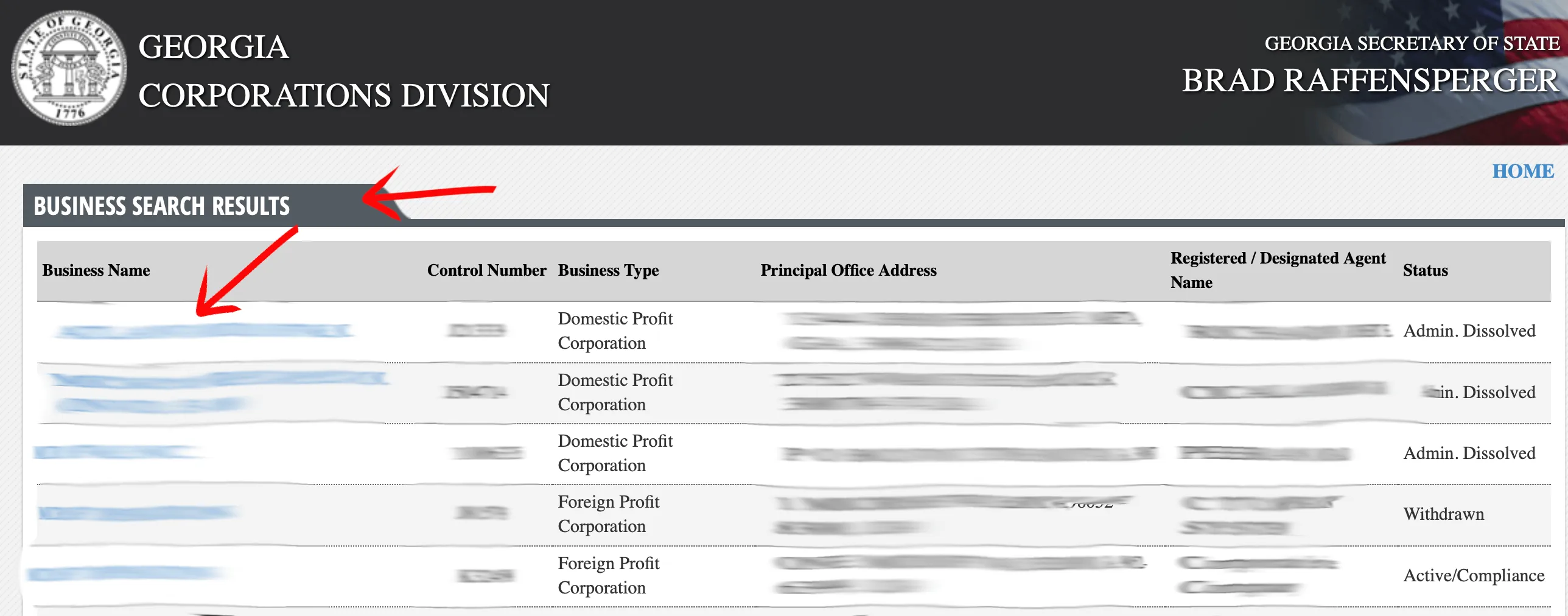
The system will load a new page displaying the inquiry results. A navigation menu will appear below the table if the system returns a large number of results. Review the list of businesses using the provided columns to verify the record:
- Business Name
- Control Number
- Business Type
- Principal Office Address
- Registered Agent
- Status
Select the desired entity by clicking its “Business Name” in the first column. Note that a result with “Active/Compliance” status means the entity has a current filing on record; this does not guarantee that the name is available for new use.
View Entity Information
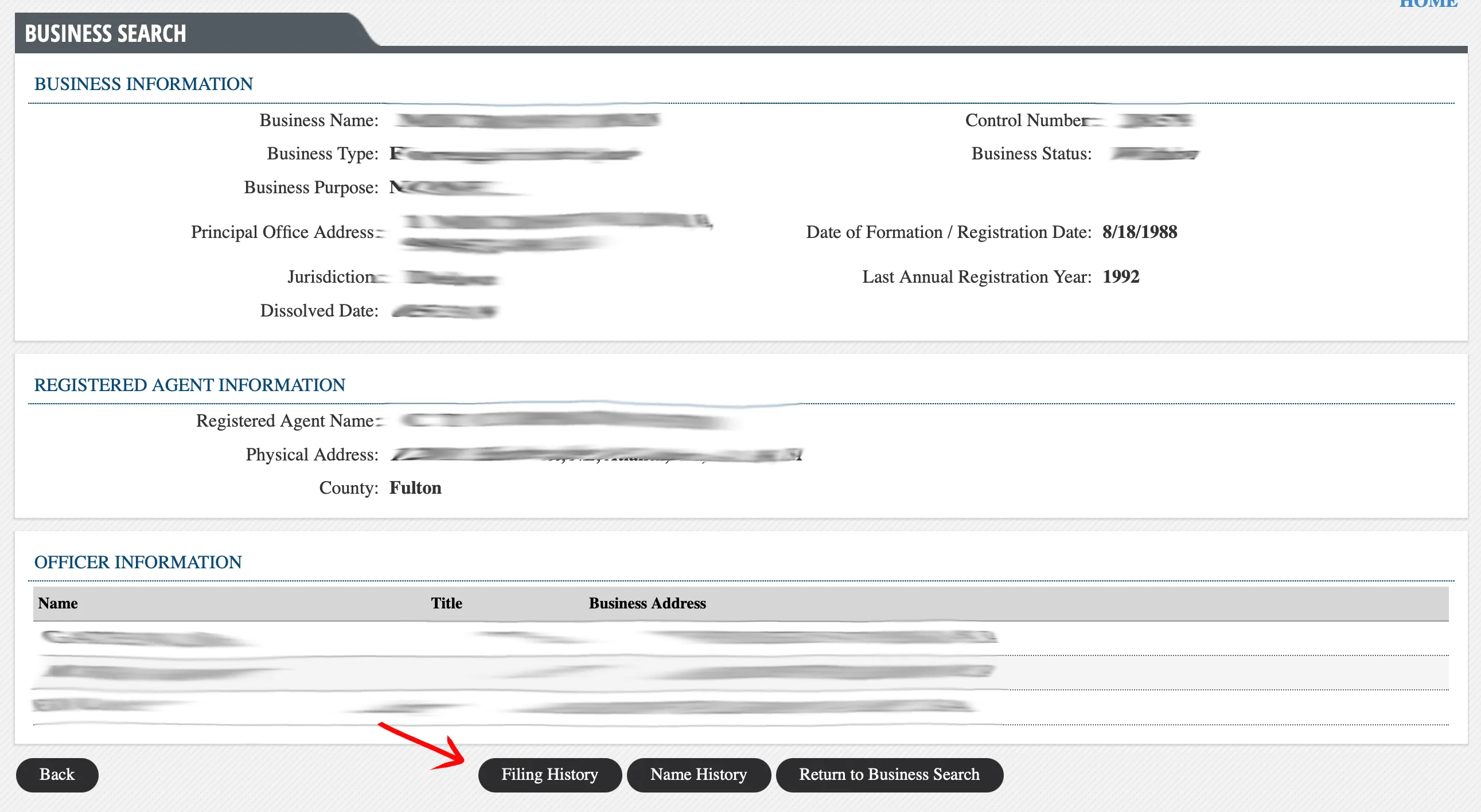
Locate and review the “Business Information” section to view details about the Georgia business entity and its registered agent. The section provides the following details:
- Business Name
- Business Type
- Business Purpose
- Principal Office Address
- Jurisdiction
- Principal Record Address
- Registered Agent Name
- Physical Address
- County
The page also includes officer information with names, titles, and business addresses. Additional sections such as Filing History and Name History may be expanded for further review.
A no-match search result is only a preliminary screening signal. Verify the proposed name in the Georgia Corporations Division search and wait for the state filing or name-reservation review before treating the name as accepted.
Check Name Availability with a Core-Word Search
For name availability research, run one more search using only the distinctive core words of your proposed name with the “Contains” match option. The results list is the availability picture: it returns every Georgia record that shares those words across all entity types, including spelling variants, plural forms, and names that differ only in a suffix.
Scan the full list, not just exact matches. Georgia checks a proposed name against existing records for distinguishability, so a near-identical active record is the conflict signal to look for. An empty or clearly distinguishable list is a good preliminary sign, but the Corporations Division makes the final call when it reviews your filing or name reservation.
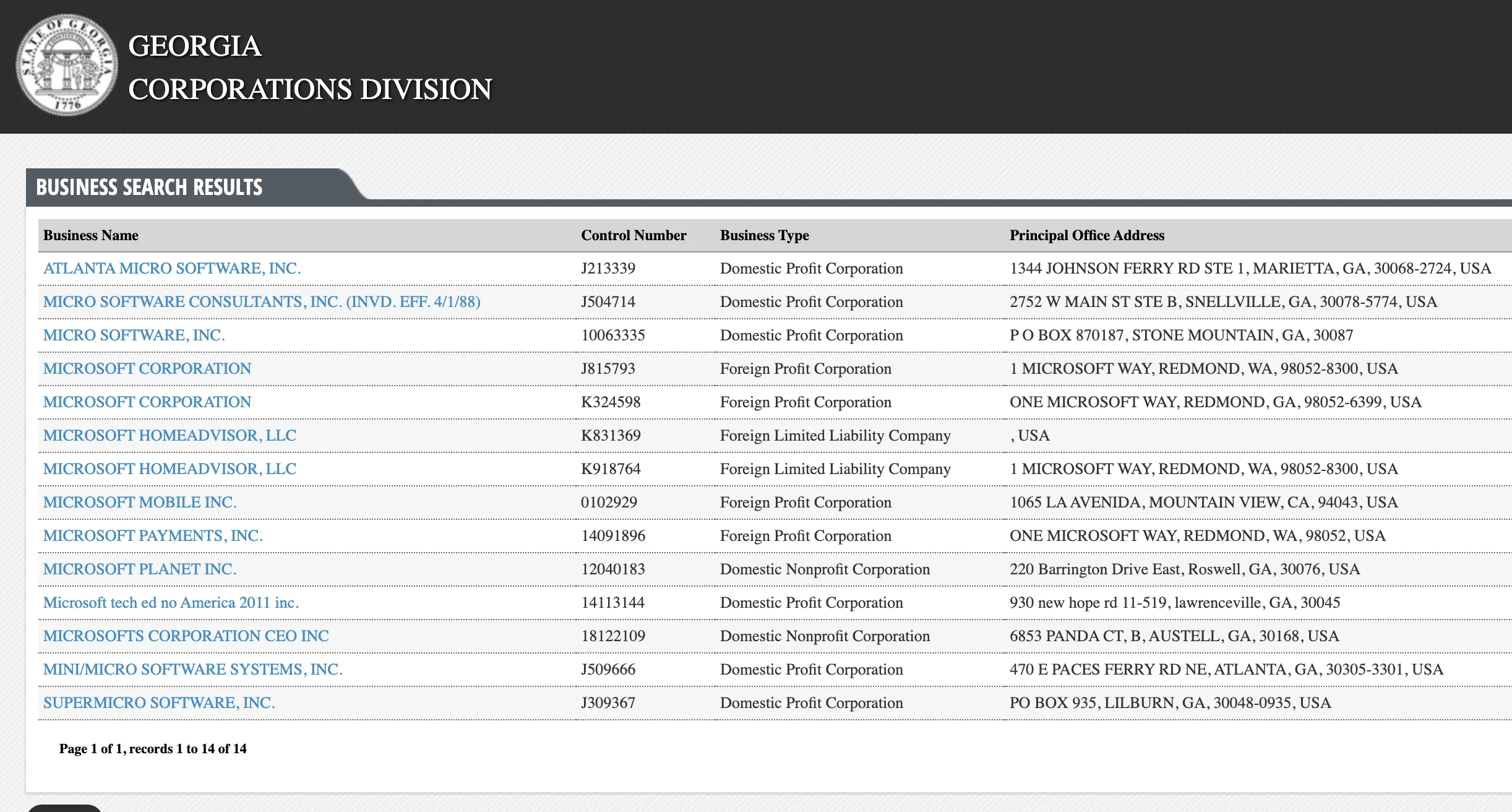
If the search results return no close matches for Georgia, treat that as a preliminary screening signal only. Verify the name in the official state database, and wait for the state filing or name-reservation review before treating the name as accepted.
How to Interpret Georgia Results
Open the Georgia entity details page to verify the Control Number, business name, business type, status, registered agent, principal office, and filing history. The Control Number is the most reliable way to distinguish entities with similar names, especially when old annual registrations or amendments are involved.
Georgia status labels such as Active/Compliance describe an existing entity’s record. They do not mean the name is available for a new filing. For name research, compare the distinctive words across exact, starts-with, and contains-style searches before relying on the absence of an exact match.
Georgia Business Name and Filing Notes
Georgia’s Corporations Division keeps the search, name reservation, formation filing, and annual registration workflows separate. Use the public search for research, but use the filing services when you need to reserve a name, form an entity, or file the annual registration.
The Georgia name reservation process costs $35 ($25 plus $10 service charge) and lasts 30 days from approval or until the formation filing is submitted, whichever comes first. The reservation fee is nonrefundable. If timing matters, reserve the name rather than relying only on a search result. The registered agent in Georgia must have a physical street address in the state.
Common Mistakes
- Ignoring the Control Number: Use it to confirm the exact Georgia record when names are similar.
- Misreading Active/Compliance: That status confirms an existing record; it does not make the name available.
- Using only exact match: Starts-with and contains-style searches can reveal similar names that exact match misses.
- Skipping filing history: Annual registrations and amendments can explain why a record still matters.
- Missing the April 1 annual registration deadline: Georgia annual registration is separate from formation and name search.
- Treating the search as approval: The Corporations Division makes the final name decision during filing or reservation review.
Sources Reviewed
- Georgia Secretary of State Corporations Division Business Entity Search
- Georgia Corporations Division Filing Fees
- Georgia LLC Annual Registration Guide
- Georgia Secretary of State Corporations Division
- Georgia Name Reservation Guide
Search beyond Georgia
Company names are registered state by state, so a name that is taken in Georgia may still be available elsewhere. The Secretary of State business search directory lists the official registry, agency contacts, and filing fees for all 50 states, the free LLC lookup guide covers name checks and LLC record details in every state, and our guide to nationwide business entity search explains how to check several states at once.
Registering in a nearby state instead? See the Florida business entity search, North Carolina business entity search, and Tennessee business entity search guides.