
Quick Answer
Use the Indiana Secretary of State INBiz Business Search to run an Indiana entity search by business name, business ID, filing number, registered agent, or incorporator or governing person. For name research, begin with Business Name and Contains, then compare Starts With and Exact Match results for close variations. A search with no close matches is only a preliminary signal; the Secretary of State makes the final name determination when it reviews a filing or name reservation.
How to Search Indiana Business Entity Records
Indiana business records are available through the Secretary of State’s INBiz public search portal. The form supports broad name research, identifier searches, registered-agent and governing-person searches, and optional filters for entity type, status, name type, and location.
Open the INBiz Business Search
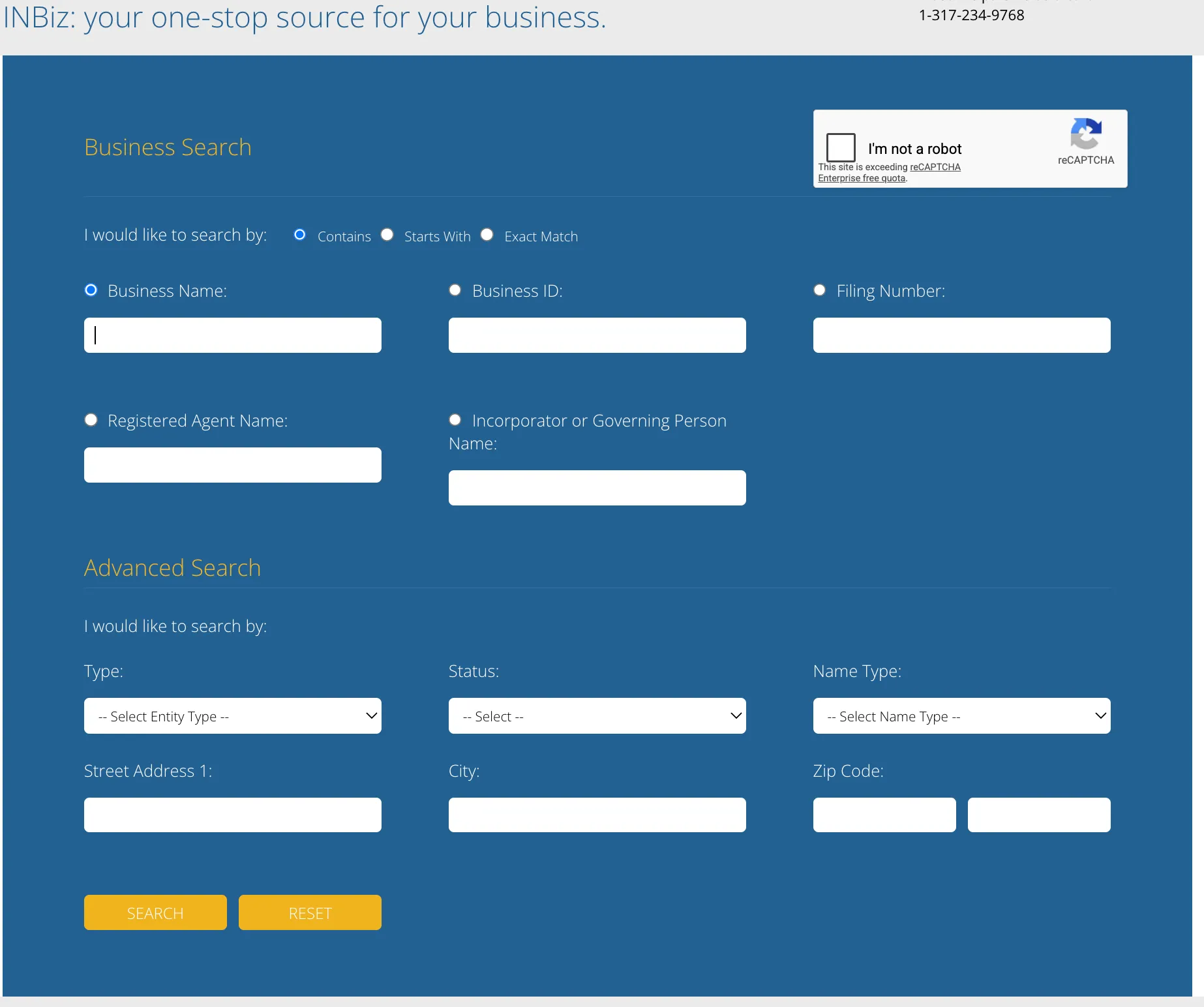
Go to the Indiana Secretary of State INBiz Business Search. The public form allows searches by Business Name, Business ID, Filing Number, Registered Agent Name, or Incorporator or Governing Person Name. The page also includes a verification control that may need to be completed before submitting the query.
Choose Search Parameters and Run the Query
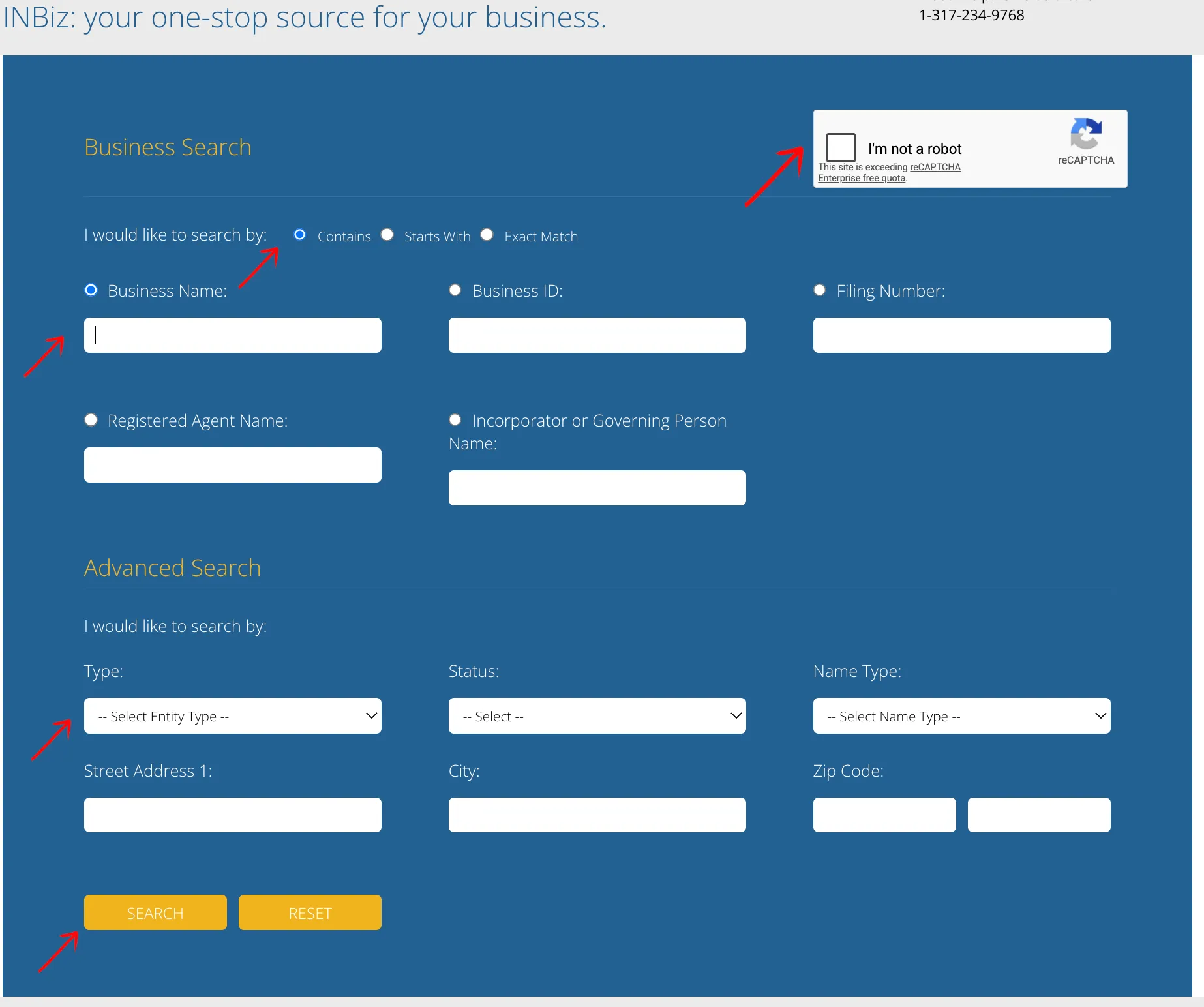
For proposed-name research, select Business Name and begin with Contains so the portal can return names that use the wording inside a longer entity name. Repeat the search with Starts With or Exact Match when you need a narrower comparison.
Optional advanced filters include Type, Status, Name Type, Street Address, City, and ZIP Code. Use filters carefully: narrowing too early can hide records that are relevant to name research. Complete the verification control and select “Search.”
Review Matching Business Records
The results table can show Business ID, Business Name, Name Type, Entity Type, Principal Office Address, Registered Agent Name, and Status. Compare exact and similar names rather than relying only on the first result. Use the navigation controls when the result set spans multiple pages, then select the Business ID in the first column to open the public entity record.

Review Entity Details and History
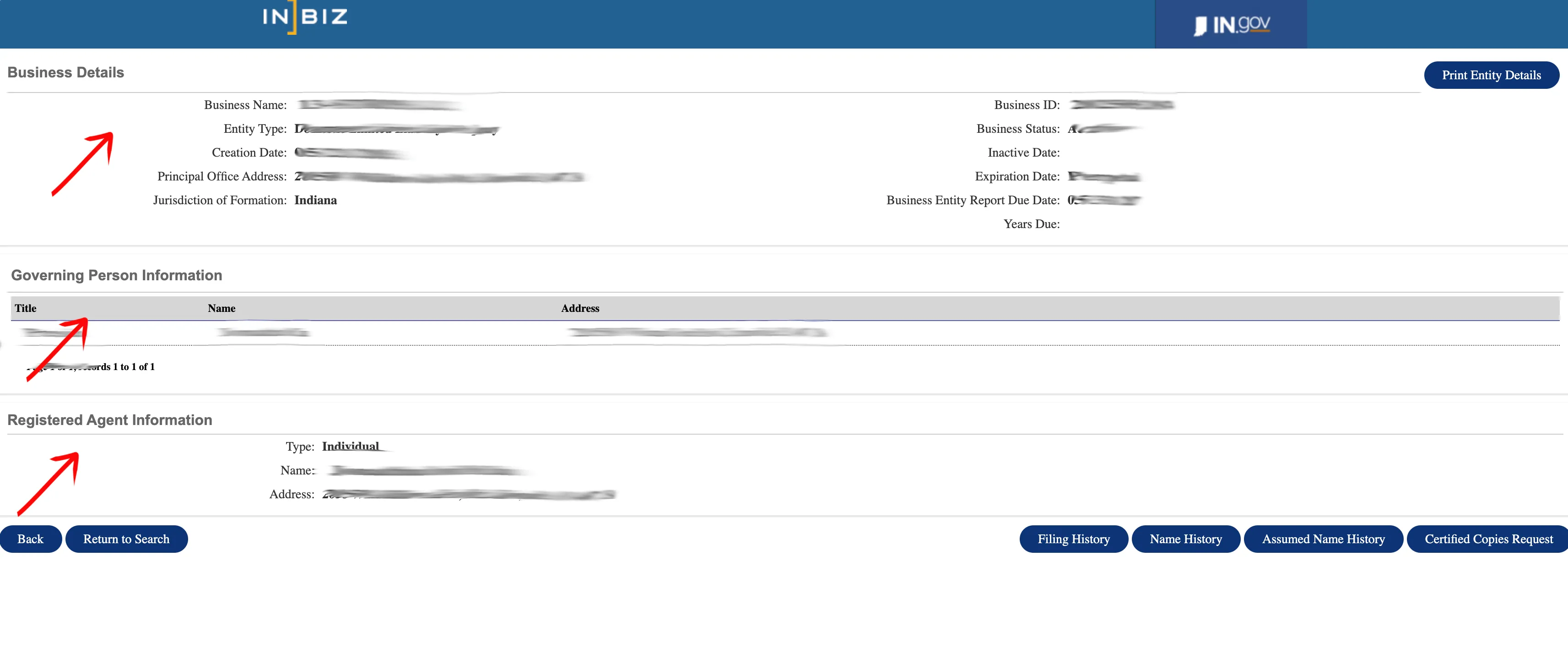
The detail page can display the business name, entity type, creation date, principal office address, jurisdiction of formation, business ID, status, inactive or expiration dates, Business Entity Report due date, and years due.
The page can also list Governing Person Information and Registered Agent Information. Use Filing History, Name History, and Assumed Name History to investigate changes connected to the entity. A Certified Copies Request is a separate records service and should not be confused with the free public search.
If the search results return no close matches for Indiana, treat that as a preliminary screening signal only. Verify the name in the official state database, and wait for the state filing or name-reservation review before treating the name as accepted.
How to Interpret Indiana Results
Treat INBiz results as public-record research, not as final name approval. Compare exact matches, close spelling variants, punctuation and spacing changes, singular and plural forms, assumed names, and names that differ mainly by an entity designator. An active record deserves close review, but inactive, revoked, cancelled, or administratively dissolved records can still be relevant to name research.
Use Contains for the broadest first pass, then Starts With and Exact Match to test how the proposed wording appears in the registry. Open the entity record and review Name History and Assumed Name History before concluding that a similar result is unrelated.
Indiana Business Name and Filing Notes
Indiana business formation and ongoing reports are handled through INBiz, the state’s single filing portal. Two Indiana rules matter for name research in particular:
- Reports are biennial, not annual. Indiana LLCs file a Business Entity Report every two years, due by the end of the anniversary month of formation. Most states run this on an annual cycle, so an Indiana record can look neglected to someone reading it with another state’s calendar in mind. The entity detail page shows both the report due date and the years due, which is the fastest way to tell whether a similar-sounding record is genuinely current.
- Name reservation is cheap and time-boxed. Reserving a name costs $10 through INBiz and holds the wording for 120 days, renewable (Ind. Code § 23-0.5-3-3). That is the only step that actually holds a name; a clear search does not.
Filing costs, for planning the search against a budget:
- Articles of Organization (domestic LLC), State Form 49459: $95 filed online, made up of the $75 statutory electronic fee under IC 23-0.5-9-19 plus $20 enhanced access under 75 IAC 8-3-4. The paper filing is $100.
- Business Entity Report: $32 filed online through INBiz for a for-profit entity, $50 on paper. Nonprofits pay $22 online.
Name search and name reservation remain separate actions. A clear search does not reserve the wording or guarantee acceptance, and the Secretary of State makes the final determination when it reviews the filing. Review the current official filing and reservation instructions before submitting formation documents or committing money to branding based on a proposed name.
Common Mistakes
- Searching only with Exact Match and missing close records found by Contains.
- Adding LLC, Inc., Corp., or another entity ending before checking the distinctive wording.
- Applying entity type or status filters so early that relevant records are hidden.
- Treating a no-match result as final Indiana name approval.
- Looking only at the result table instead of opening Business ID details.
- Ignoring Name History or Assumed Name History for a similar entity.
- Assuming an inactive, revoked, cancelled, or administratively dissolved record is irrelevant.
- Reading an Indiana record on an annual-report assumption. The Business Entity Report is biennial, so a record can be fully compliant in a year with no filing.
Sources Reviewed
- Indiana Secretary of State INBiz Business Search
- Indiana INBiz Business Services
- Indiana Secretary of State Business Forms
- Indiana INBiz Business Entity Report
Search beyond Indiana
Company names are registered state by state, so a name that is taken in Indiana may still be available elsewhere. The Secretary of State business search directory lists the official registry, agency contacts, and filing fees for all 50 states, the free LLC lookup guide covers name checks and LLC record details in every state, and our guide to nationwide business entity search explains how to check several states at once.
Registering in a nearby state instead? See the Illinois business entity search, Ohio business entity search, and Michigan business entity search guides.