
Quick Answer
Use the Kansas Secretary of State Business Entity Search portal to run a Kansas entity search by business name, Secretary of State ID, or current resident agent name. For most name checks, start with a By Business Name search using distinctive words, then compare exact and similar records before filing. A no-match result is only preliminary; final name acceptance happens when Kansas reviews the filing or name reservation.
How to Search Kansas Business Entity Records
Kansas business entity searches are conducted through the Secretary of State’s online Business Entity Search application. You must complete a security verification step before entering your search criteria and viewing matching records.
Access the Business Entity Search Portal
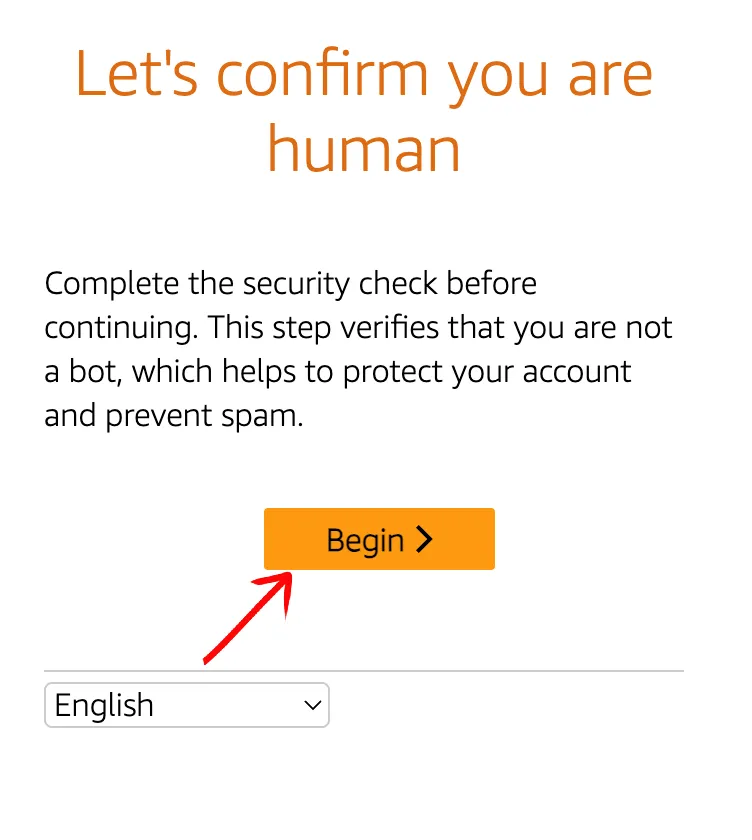
Go to the Kansas Business Entity Search portal at https://www.sos.ks.gov/eforms/BusinessEntity/Search.aspx. The portal will initially load the security check screen. Select your preferred language from the drop-down menu and prepare to start the status verification.
Complete the Status Verification
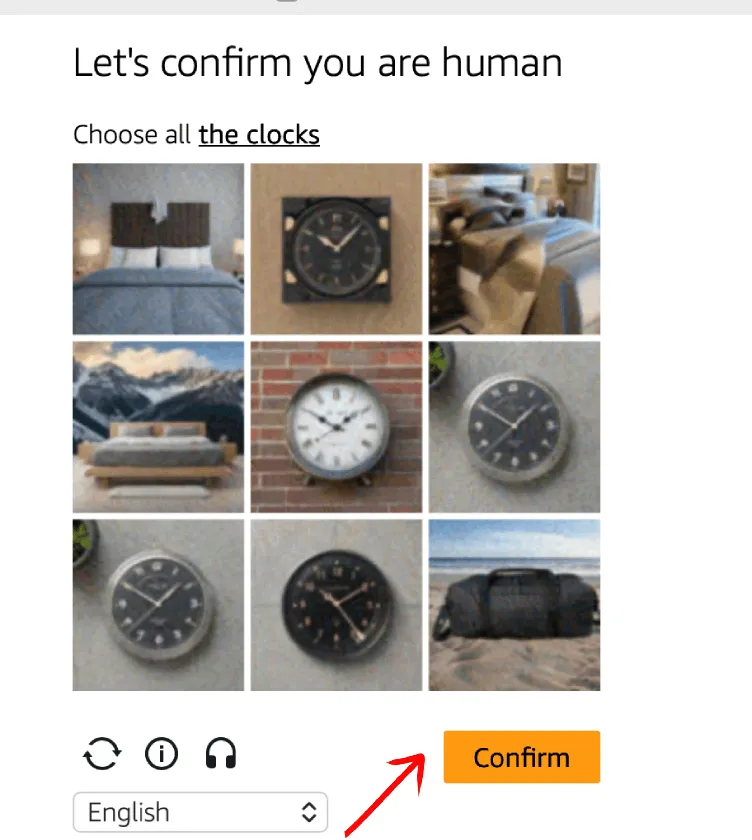
Click “Begin” to start the status verification. Follow the on-screen directions to complete the puzzle (for example, selecting all matching images of clocks), then click “Confirm”. If necessary, use the available menu icons to refresh the image, see more information, enable accessibility options, or select a language.
Define Your Search Parameters
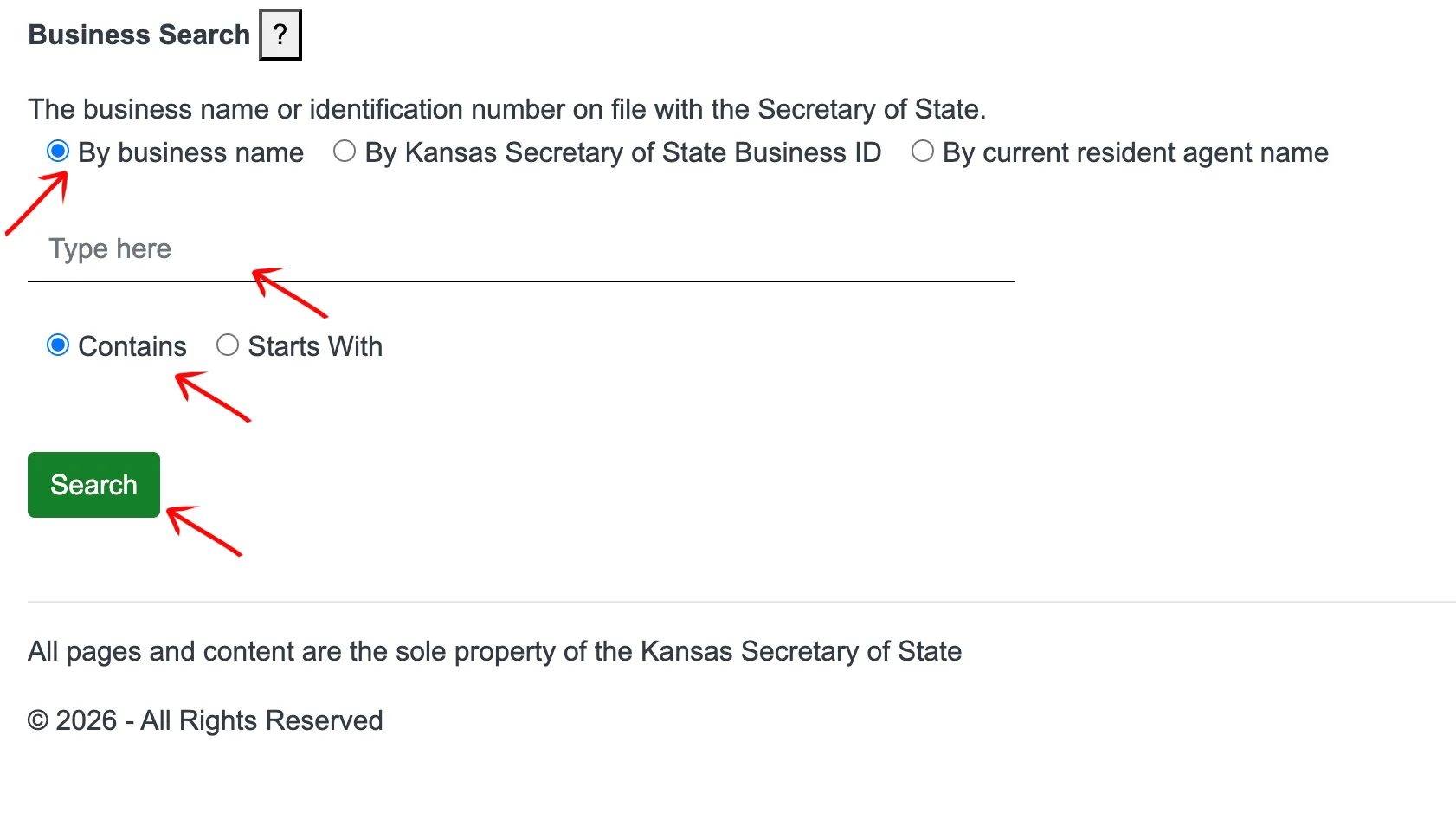
Select the radio button that corresponds to your preferred search method:
- By Business Name
- By Kansas Secretary of State ID
- By Current Resident Agent Name
Type the words you want to search into the input field. Partial entries are allowed. Specify how the query tool should search the database by selecting one of the following radio buttons:
- Contains: Finds any entity containing the search term anywhere in its name.
- Starts With: Finds entities that begin with your search term.
Click the “Search” button to execute the query.
Review the Search Results Table
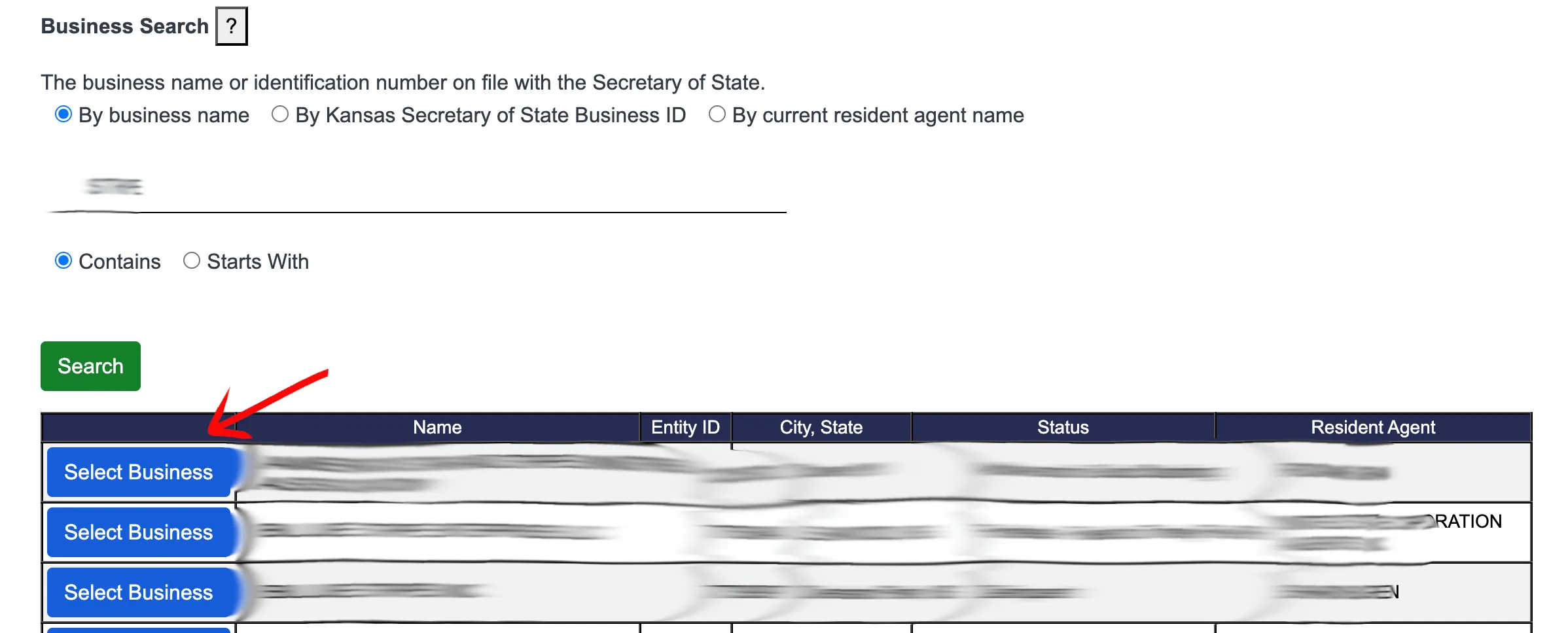
Examine the search results table that opens below the query tool. Look over the results across the following columns:
- Select Business: Click the button in this column to open a record.
- Name: The registered name of the business.
- Entity ID: The official Secretary of State ID number.
- City, State: The location of the business principal office.
- Status: Current standing (e.g., Active, Forfeited, Dissolved).
- Resident Agent: The designated resident agent on record.
Click the button in the first column next to the specific business entity you want to explore.
View the Detailed Entity Record
Review the “General Information” tab to view data on the selected business entity. If you require further information, select a specific year from “Report Year” or access the “View Documents” tab to purchase scanned copies of official filings. The record displays the following fields:
- Entity ID Number
- Entity Type
- Principal Address
- Principal Mailing Address
- Status (e.g., Active, Forfeited, Dissolved)
- Place of Formation
- Formation date
- Qualify Date
- Registered Agent Name
- Registered Office Street Address
- Registered Office Mailing Address
- Nature of Business
- Capital Authorized
- Capital Paid In
- Forfeiture Date
- Annual Reports (Report Year)
- Transactions (Transaction Date(s), Legal Name Merged, Miscellaneous Filing Entry, Registered Agent Changed From)
- Scanned Documents (Purchase Document Copies, Document Date, Type, Pages)
A no-match search result is only a preliminary screening signal. Verify the proposed name in the Kansas Secretary of State search and wait for the state filing or name-reservation review before treating the name as accepted.
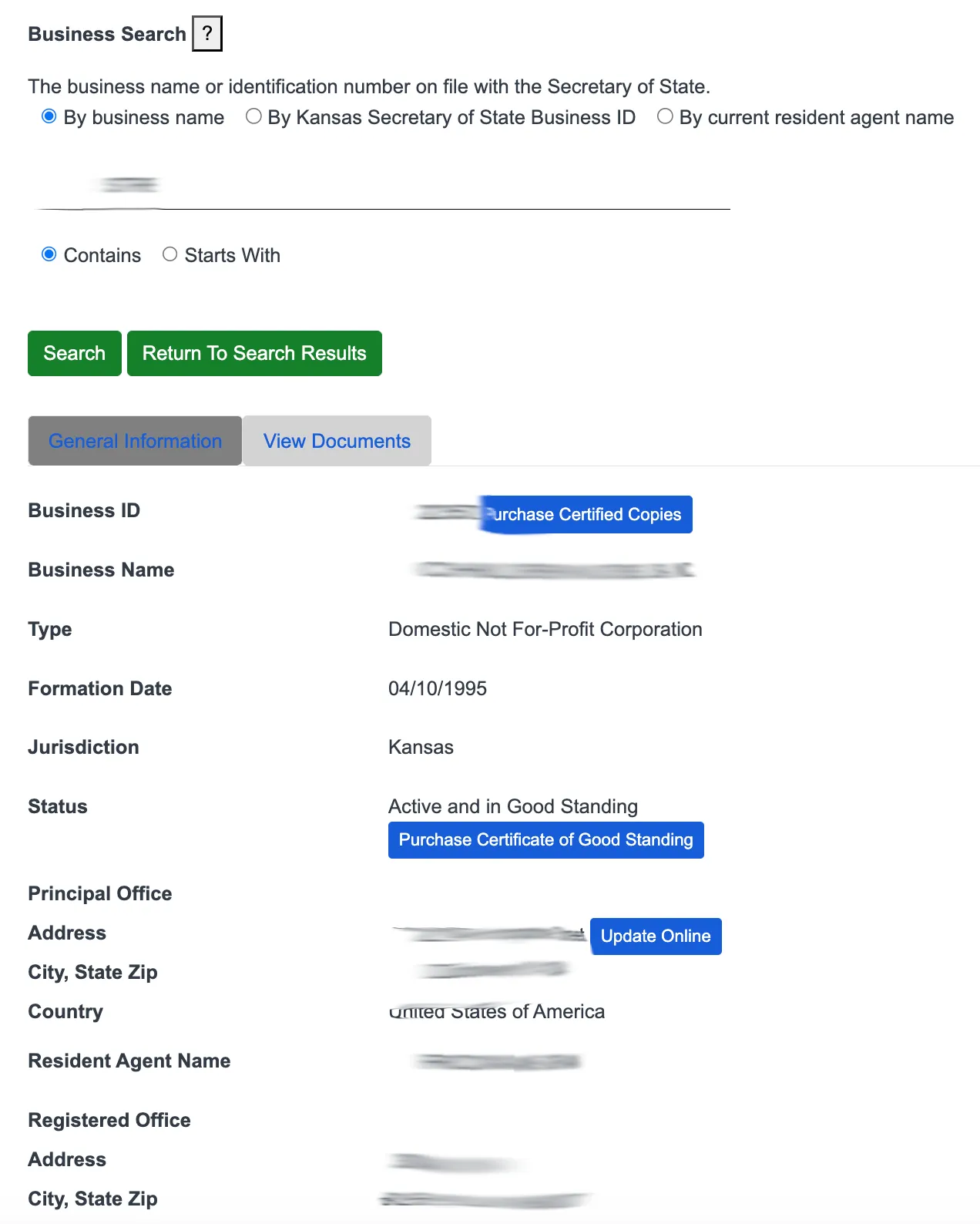
If the search results return no close matches for Kansas, treat that as a preliminary screening signal only. Verify the name in the official state database, and wait for the state filing or name-reservation review before treating the name as accepted.
How to Interpret Kansas Results
A Kansas result can include the entity’s Secretary of State ID, resident agent, status, transaction history, and scanned document links. Use the detail page rather than only the result list, because the transactions and scanned documents can reveal mergers, agent changes, or historical filings that change how a similar name should be interpreted.
Kansas applies a distinguishable upon the record standard. Compare the core wording before entity identifiers such as LLC, Inc., Corp., or Association, and test spelling variations, plurals, and phonetic similarities. If a proposed name is too close to an existing one, Kansas may require written consent through Form CN or a different name.
Kansas Business Name and Filing Notes
Kansas has a few filing details that are easy to confuse with other states: information reports are biennial, name reservations are not renewable, and the state does not register LLC DBAs at the state level.
- LLC Filing Fees: Filing Articles of Organization for a domestic Kansas LLC costs $85 when filed online, or $90 when filed by paper.
- Name Reservation: If you want to reserve a name before filing, you can submit an Application for Reservation of Name. A name reservation is effective for 120 days and costs $35. Name reservations cannot be renewed.
- Information Reports: Kansas business entities must file information reports every two years (biennially) instead of annual reports. The filing year depends on the year of organization (e.g., entities formed in even-numbered years file in even years). For-profit entities are due by April 15 of their filing year, and the report costs $90 online or $110 by paper.
- DBAs / Fictitious Names: Kansas does not register “Doing Business As” (DBA) or fictitious names for LLCs at the state level. If you want to operate under a name other than your legal LLC name, you must file a business name certificate or register a separate entity.
Common Mistakes
- Skipping transaction history: The detail page can show mergers, resident-agent changes, and older scanned documents that are not visible in the first result list.
- Missing similar-sounding names: Kansas distinguishability is not solved by punctuation, pluralization, or entity endings.
- Assuming Form CN is automatic: Written consent to use a similar name is a separate step and should not be assumed during name research.
- Trying to register a DBA at the state level: Kansas does not support state-level DBA registration for LLCs.
- Missing biennial report timing: Information reports are due based on the entity’s organization year, not every calendar year.
Sources Reviewed
- Kansas Secretary of State Business Entity Search
- Kansas Secretary of State Business Services Portal
- Kansas Secretary of State Filing Fees Schedule (Form DL)
- Kansas Business Entity Information Report (Form ILC)
- Kansas Business Name Reservation Form (Form NR)
- Kansas Business Entity Information Reports
Search beyond Kansas
Company names are registered state by state, so a name that is taken in Kansas may still be available elsewhere. The Secretary of State business search directory lists the official registry, agency contacts, and filing fees for all 50 states, the free LLC lookup guide covers name checks and LLC record details in every state, and our guide to nationwide business entity search explains how to check several states at once.
Registering in a nearby state instead? See the Missouri business entity search, Oklahoma business entity search, and Nebraska business entity search guides.