
Quick Answer
Use the Massachusetts Corporations Online portal from the Secretary of the Commonwealth Corporations Division to run a Massachusetts entity search by entity name, individual name, identification number, or filing number. For name research, start with Entity Name and omit designators such as LLC while checking active and similar records. A clear search is only preliminary; final acceptance happens during filing or reservation review.
How to Search Massachusetts Business Entity Records
Massachusetts business registrations are maintained by the Corporations Division of the Secretary of the Commonwealth. The division provides a free online search tool through its Corporations Online portal to verify name availability, check an entity’s standing, and access filing history.
Access the Corporations Online Search Portal
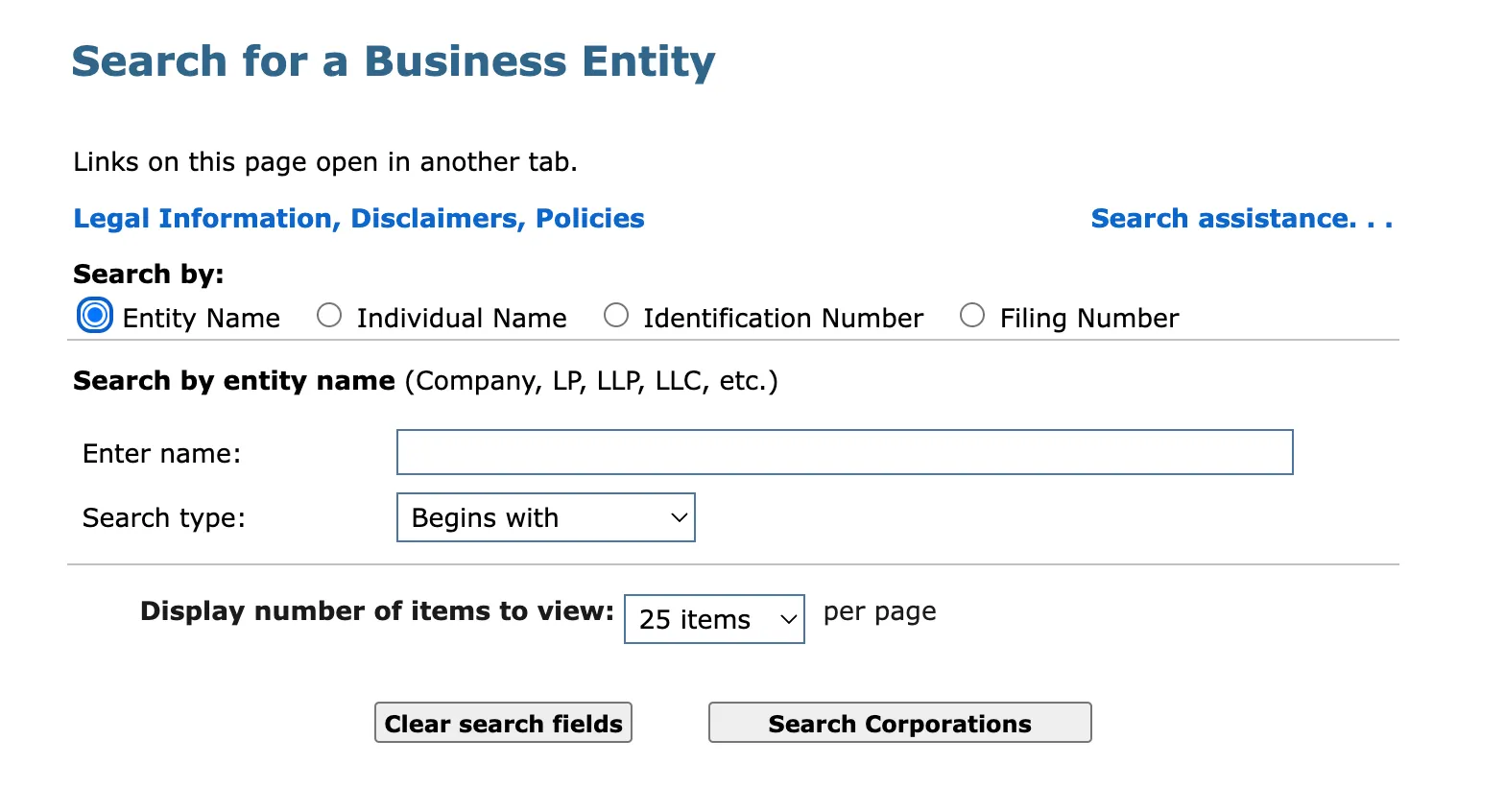
Go to the official Massachusetts Corporations Online search page to begin. The landing page displays search options to look up a business by name, individual name, identification number, or filing number.
Enter Your Search Parameters
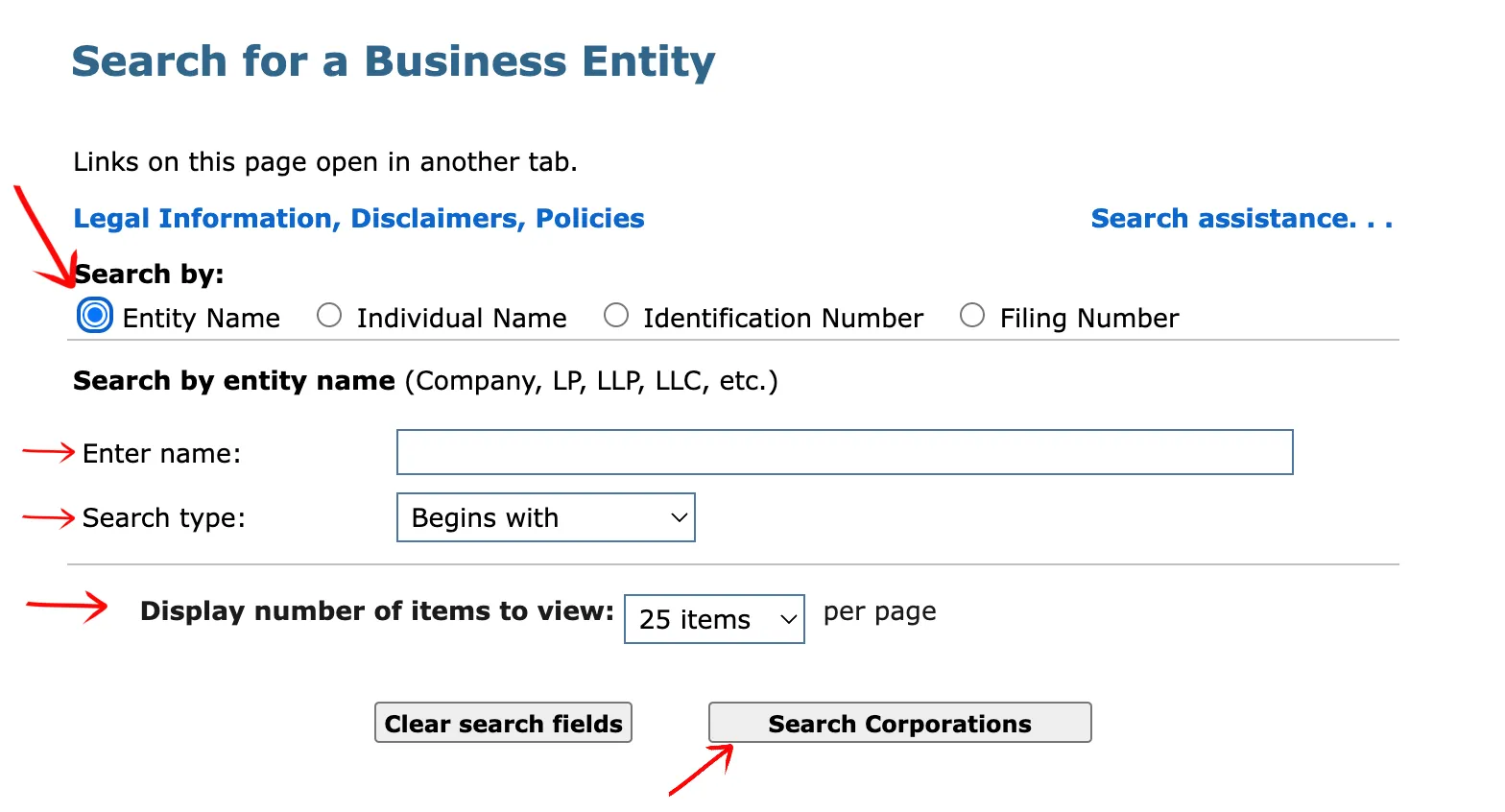
Review the available search options on the page. Select the first option to search the database for the name of a specific entity. The database allows you to search using these criteria:
- Entity Name
- Individual Name
- Identification Number
- Filing Number
Type the business name or at least one word of the name into the search box. Use the drop-down menu to choose where the criteria will appear in the name, and select the first option to search for the criteria at the beginning of an entity name.
Select the number of results you want to display per page from the drop-down menu:
- 25 results
- 50 results
- 100 results
Click the Search Corporations button.
Select the Appropriate Record
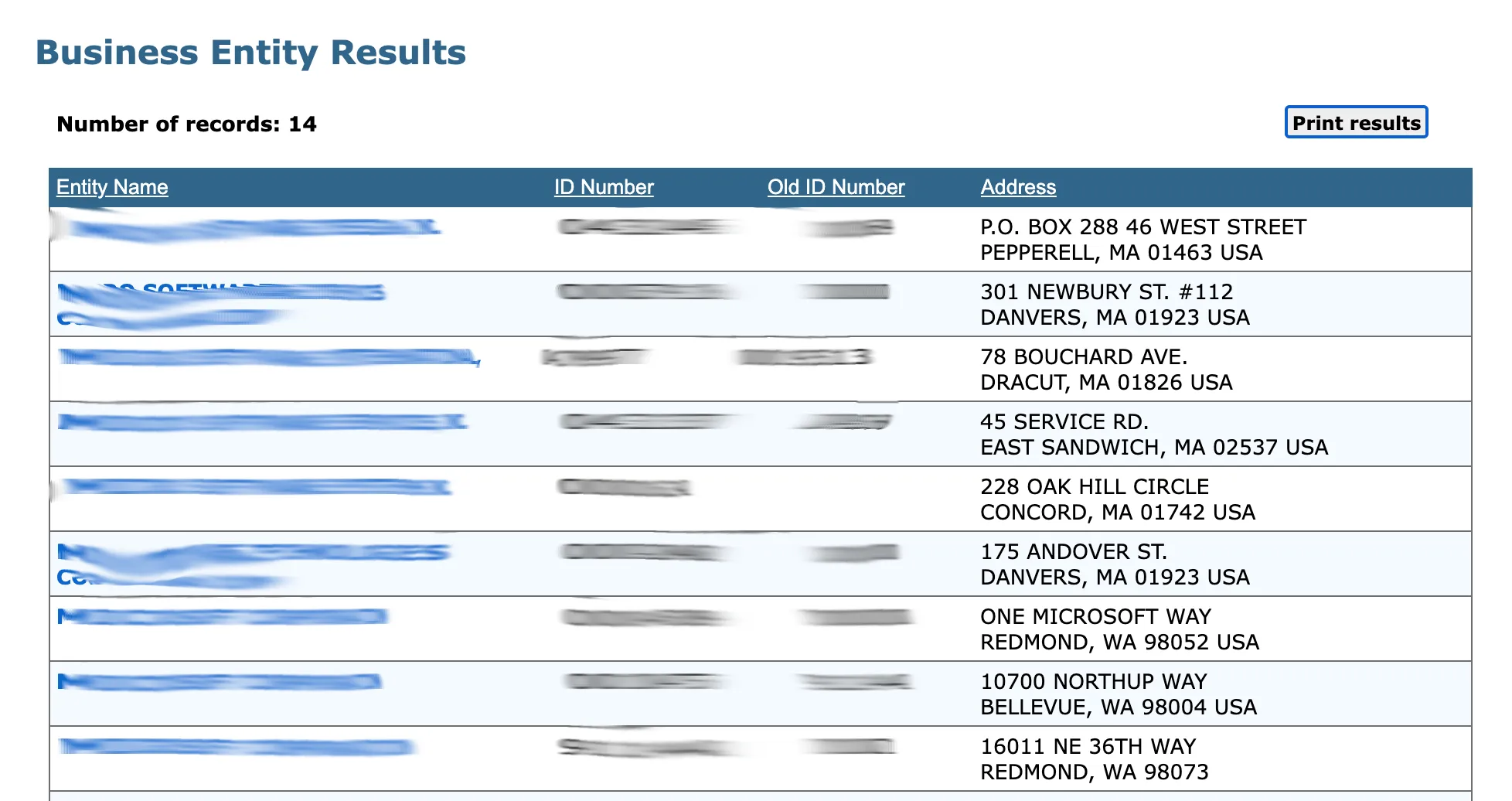
Locate the specific business from the table of search results. The table includes these columns of data:
- Entity Name
- ID Number
- Old ID Number
- Address
Click the entity name in the first column to view more information.
View the Entity Details
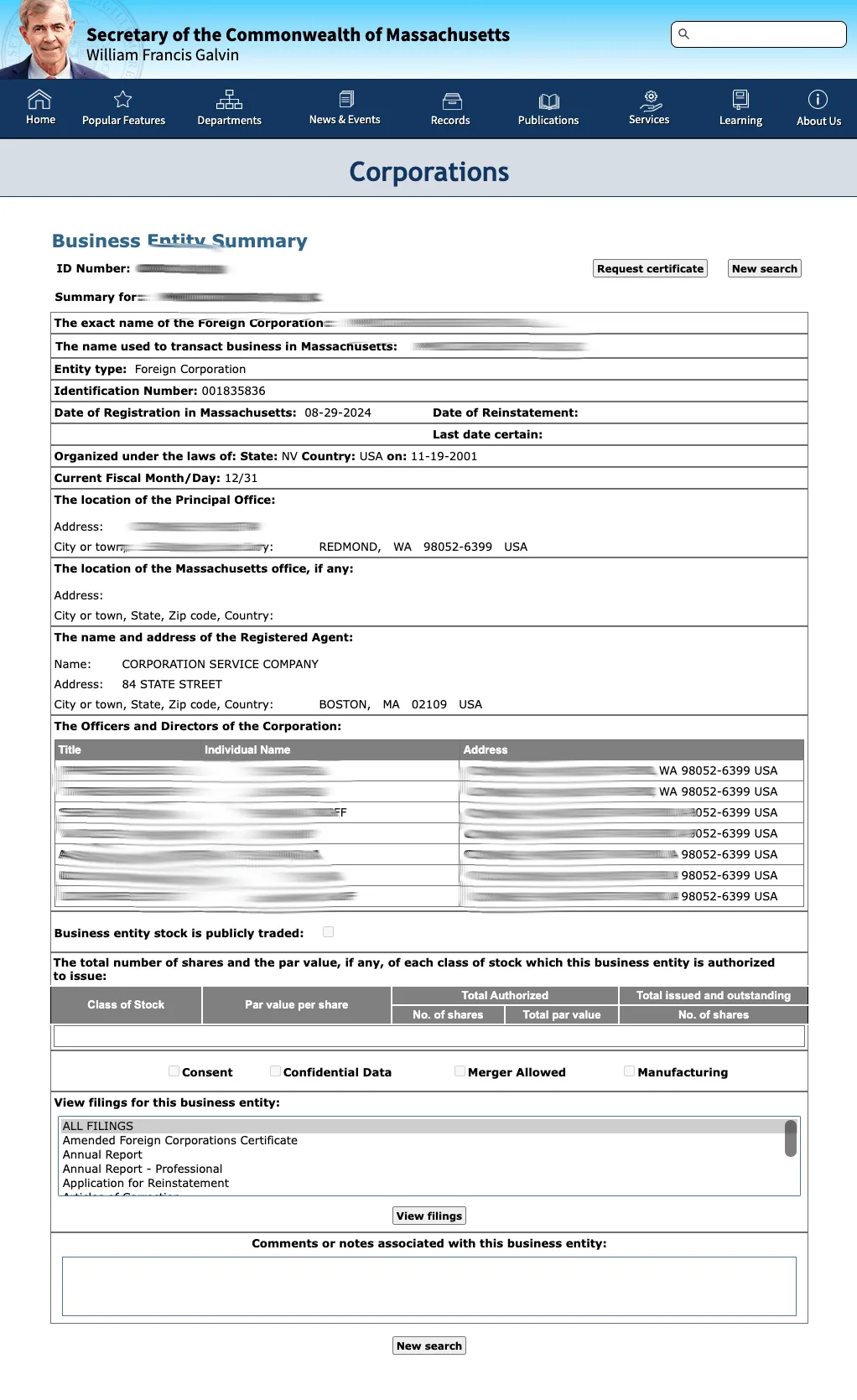
Review the information provided on the Business Entity Summary page. The main section displays the following fields:
- Summary For
- Exact Name
- Merged Into
- Entity Type
- Identification Number
- Date Of Organization In Massachusetts
Review the next section to view relevant dates for the entity:
- Last Date Certain
- Current Fiscal Month/Day
- Previous Fiscal Month/Day
Review the contact and management details in the following sections:
- Location Of Principal Office
- The Name And Address Of The Registered Agent
- Officers And Directors
If the entity can issue stock, a checkmark will confirm this fact. You can review these details in the display area:
- Business Entity Is Publicly Traded
- Class of Stock
- Par Value Per Share
- Total Authorized
- Total Issued
- Consent
- Confidential Data
- Merger Allowed
- Manufacturing
Check Filing History
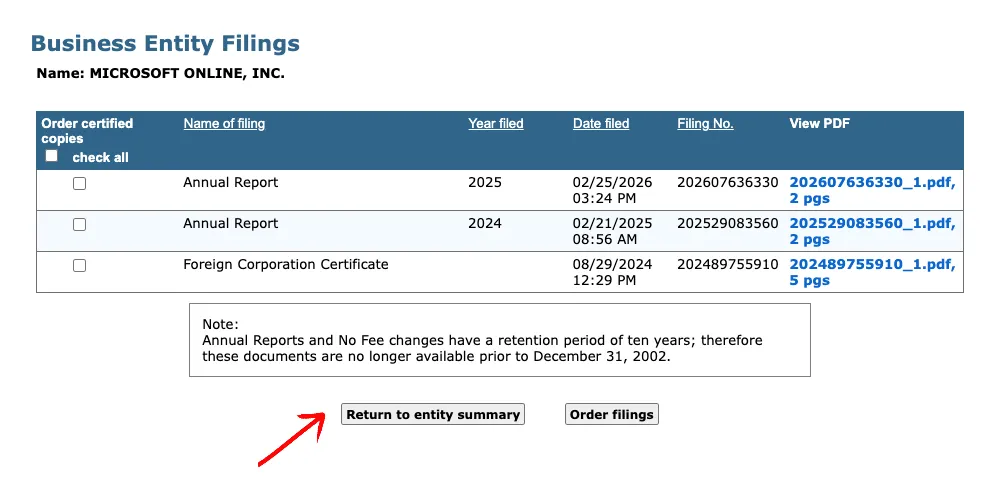
To review previous filings of the entity, select a filing from the list in the text box and click the View Filings button. The filing history displays a chronological record of documents submitted by the entity, including amendments, annual reports, and other public actions. You can review each filing entry to confirm the entity’s compliance history and good standing.
If the search results return no close matches for Massachusetts, treat that as a preliminary screening signal only. Verify the name in the official state database, and wait for the state filing or name-reservation review before treating the name as accepted.
How to Interpret Massachusetts Results
A Massachusetts business search helps you determine whether a proposed name is available or whether an existing business is in good standing.
- Active (Good Standing): The entity has filed all required annual reports and paid necessary fees, and it holds the exclusive right to use its name in Massachusetts records.
- Dissolved / Inactive / Withdrawn: The entity has been dissolved voluntarily or administratively by the state, or has withdrawn its registration. Inactive names may become available for registration after statutory protection periods expire.
- Distinguishability: A proposed business name must be distinguishable from all other registered names on file with the Corporations Division. The state ignores corporate designators (such as LLC, Inc., Corp.), punctuation, capitalization, and spaces when determining distinguishability.
Massachusetts Business Name and Filing Notes
Massachusetts Corporations Online lookup is separate from formation filings, name reservation, and annual report maintenance through the Corporations Division:
- LLC Filing Fees: Filing the domestic Articles of Organization for a Massachusetts LLC costs $500.
- Name Reservation: You can reserve an available business name for 60 days by filing a Name Reservation application. The filing fee is $30. The reservation may be extended for an additional 60 days with another $30 fee.
- Annual Reports: Every Massachusetts business must file an annual report to maintain active status. For a domestic LLC, the annual report fee is $500 and is due on or before the anniversary date of the original certificate of organization filing.
- Assumed Names (DBAs): If your entity conducts business under a name other than its legal name, you may need to register the trade name for certain tax purposes. The Corporations Division does not register trade names; these are handled at the local level.
Common Mistakes
- Searching Only the Full Name: Searching only for your exact planned name can miss closely similar active registrations. Use a distinctive partial keyword to catch variants that could conflict during manual review.
- Including Suffixes in Search Queries: Typing “LLC” or “Incorporated” in the search box may exclude similar business names that use different designators or spellings. Omit suffixes to reveal potential conflicts.
- Missing the Annual Report Anniversary Deadline: Massachusetts strictly enforces the annual report deadline based on the entity’s anniversary date. Failure to file results in a late fee and will eventually lead to administrative dissolution, causing the business to lose good standing and exclusive name rights.
- Assuming Search Availability is Official Approval: Treating a successful search as a guarantee of name approval. The Corporations Division conducts a manual review of all filings before officially approving a name; search results are preliminary, not final approval.
Sources Reviewed
- Massachusetts Corporations Online Search Database
- Massachusetts Secretary of the Commonwealth Corporations Division
- Massachusetts Corporations Filing Fees
- Massachusetts LLC Annual Report Filings
- Massachusetts Name Reservations
Search beyond Massachusetts
Company names are registered state by state, so a name that is taken in Massachusetts may still be available elsewhere. The Secretary of State business search directory lists the official registry, agency contacts, and filing fees for all 50 states, the free LLC lookup guide covers name checks and LLC record details in every state, and our guide to nationwide business entity search explains how to check several states at once.
Registering in a nearby state instead? See the New York business entity search, Connecticut business entity search, and New Hampshire business entity search guides.